

The Best Financial CRM: A Simple Way to Manage Wealth and Clients
In the financial world, your clients are trusting you with their future....
Move your CRM data, deals, users, and workflows from Salesforce to Zoho CRM without downtime or data loss.
Handled by Zoho Authorized experts serving India, UK, USA, Europe, and Middle East.
Book Free Consultation
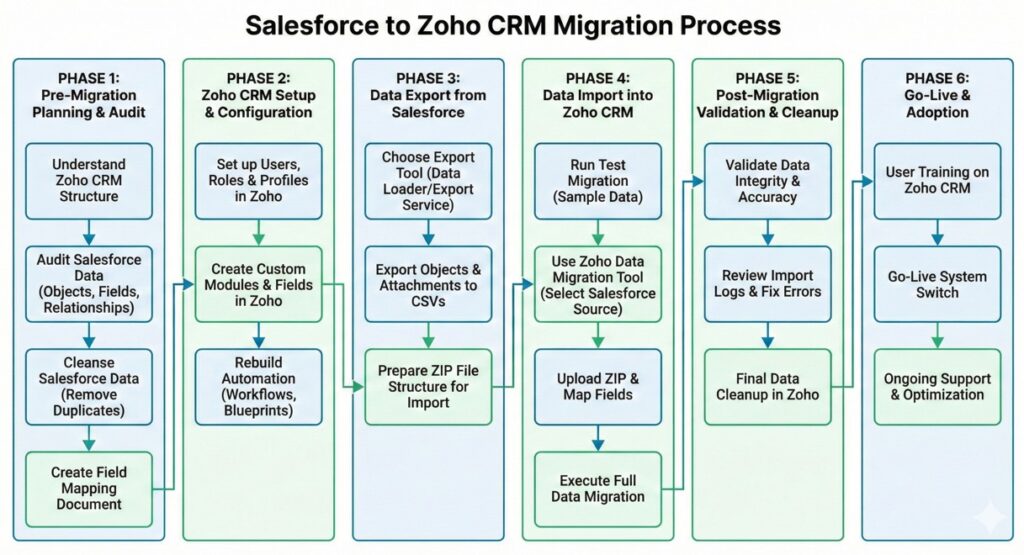
Salesforce to Zoho CRM migration is the process of transferring customer data, workflows, and automations from Salesforce's cloud platform to Zoho CRM. This includes migrating Accounts → Companies, Opportunities → Deals, Contacts → Contacts, and custom objects while preserving data relationships.
Forward-thinking companies make this switch to significantly reduce licensing costs, gain access to a more flexible, low-code environment, and improve team adoption through Zoho’s intuitive, easy-to-use interface.
Smart organizations are moving away from legacy costs and towards agility. Here is the business case for the switch:
During a salesforce to zoho crm data migration, B2B teams usually worry about losing critical sales history or deal context. That does not happen. The scope is defined upfront, and every required data set is mapped before execution from Salesforce to Zoho CRM Migration. In a salesforce to zoho crm data migration, B2B teams want one thing confidence that no sales data goes missing. The migration covers all essential records and business logic while moving from Salesforce to Zoho CRM
For years, Salesforce was the default choice for growing businesses. But today, the default is shifting. Companies are no longer just looking for a database; they are looking for agility. The migration to Zoho CRM is driven by a need to escape 'software bloat' where you pay for 100% of a tool but only use 10%. Modern leaders are switching because they need a system that adapts to their sales process, not one that forces them to adapt to it. It’s not just about saving money; it’s about removing the friction between your sales team and their data.
Stop paying the 'legacy tax.' Zoho CRM provides comparable enterprise features like AI prediction, territory management, and advanced analytics at a significantly lower price point. You get a transparent subscription model with no hidden costs for API access or essential add-ons, instantly improving your bottom line
Complexity kills adoption. Zoho CRM offers a modern, minimalist interface that sales reps actually enjoy using. By removing the visual clutter typical of older CRMs, we ensure your team spends less time fighting the software and more time focusing on closing deals
Agility is your competitive advantage. Unlike heavy systems that require weeks of training, Zoho’s intuitive design allows new hires to be up and running in hours. We configure the system to match your specific sales process, ensuring your team hits the ground running immediately
You shouldn't need a developer to change a notification rule. Zoho’s low-code 'Workflow Rules' and 'Blueprints' let you drag-and-drop your way to complex automation. You can automate lead assignment, follow-up emails, and deal updates without writing a single line of code
Eliminate data silos forever. Zoho CRM integrates natively with the wider Zoho ecosystem. Your sales team can view invoices from Zoho Books, support tickets from Zoho Desk, and email engagement from Zoho Campaigns directly within the customer record no expensive middleware required
| Feature | Salesforce | Zoho CRM |
|---|---|---|
| Development | Requires specialized Apex developers for changes. | Low-code/No-code (Canvas Builder, Deluge). |
| Hidden Costs | Extra fees for API access, sandboxes, and mobile features. | Transparent pricing. API and Mobile included. |
| Ecosystem | Disconnected. Integration often requires 3rd-party middleware (Zapier/Mulesoft). | Unified. Native integration with Books, Projects, and Desk. |
| Support | Standard support is slow; 24/7 support costs extra. | 24/5 or 24/7 support included in Enterprise tiers. |
| AI Features | Einstein AI is a costly add-on. | Zia AI is included in Enterprise/Ultimate editions. |
Built for Zero Data Loss and Sales Continuity. Every migration step is designed to protect revenue operations and sales history.
Book Free Consultation
In the financial world, your clients are trusting you with their future....
For the Hospitality and Travel industry, the "product" is an experience. Whether...
Case Study: How We Fixed a Chai Brand’s Franchise Order Mess With...
In the world of learning, timing is everything. Whether a parent is...
Retail isn’t just about products anymore people want personalized service, fast responses,...
In the world of non-profits, your relationships are your greatest asset. Whether...
For most small-to-mid-sized businesses, the full migration process takes between 2 to 4 weeks. Complex enterprise setups involving heavy custom objects, extensive automation, and third-party integrations typically require 6 to 8 weeks to ensure rigorous testing and zero-error deployment
No. We prioritize “Contextual Migration.” This means all historical emails, call logs, meeting notes, and tasks attached to your Salesforce records are migrated and correctly linked to the corresponding Contact or Deal in Zoho CRM
Yes. Most businesses reduce their Total Cost of Ownership (TCO) by 50% to 70%. Zoho offers enterprise-grade features (like AI prediction and advanced analytics) in their standard tiers, eliminating the need for expensive add-ons often required in Salesforce.
Absolutely. We perform a detailed “Data Mapping” phase where we recreate your unique Salesforce Custom Objects as Custom Modules in Zoho. All custom fields dropdowns, formulas, and lookups are mapped to their exact equivalents to preserve your data structure.
No. We execute the migration in a “Staging Environment” while your team continues to work in Salesforce. The final data sync happens during a scheduled window (usually a weekend), allowing your team to log out of Salesforce on Friday and log into Zoho on Monday with fresh data
Since Salesforce and Zoho use different logic engines, we don’t just copy them; we translate them. We convert your Salesforce Process Builders and Flows into Zoho Workflows and Blueprints, often optimizing them to be more efficient using Zoho’s low-code interface.
Yes. Zoho CRM Enterprise and Ultimate editions are architected for high-volume scalability. They can handle millions of records and offer robust API limits, making them a suitable replacement for large-scale Salesforce implementations.
Rarely. One of the main reasons companies switch is Zoho’s Low-Code/No-Code nature. Unlike Salesforce, which often requires Apex developers for changes, non-technical admins can easily adjust workflows, fields, and layouts in Zoho using a drag-and-drop editor.
Migrating files is complex due to API limits, but we handle it via custom scripts. We extract your attachments (contracts, proposals, invoices) from Salesforce and upload them to the “Attachments” section of the relevant records in Zoho CRM.
Yes. Zoho CRM has native integrations for major business tools like Google Workspace, Microsoft 365, and Zoom. During the migration, we re-establish these connections so your email syncing and calendar scheduling continue to function seamlessly.