Zoho One Partner: Implementation, Migration and Support for Growing Businesses
Choosing a Zoho One partner is a decision about how your business will run for years, not just a software purchase. Datahikes is a Zoho Consulting Partner delivering Zoho One implementation, migration, custom development and support to companies in more than 20 countries, including India, the United States, the United Kingdom, the UAE, Singapore and Australia. This page is written to help you decide, not to push you into it. You will find licensing guidance, how the two Zoho One plans compare, the systems we migrate from, an implementation timeline, the platform limits worth knowing about, and the people who will take your call.
Scoping calls are taken by Sam or Jay, both founders of Datahikes, so you speak with the people who plan the build.
Zoho One brings your CRM, Flow, Desk and other apps under one roof, so AI can be added after go-live: one timeline per deal, a Zia agent in shadow mode with one-tap approval for big changes, and Claude or ChatGPT through Zoho MCP for read-only questions and reports.
Book Free Consultation
Why Global Businesses Choose an India-Based Zoho One Partner
We work with businesses in the United States, the United Kingdom, Singapore, Australia, Canada and the UAE that could hire locally and choose not to. The reasons are practical rather than sentimental.
The Cost Difference, Stated Plainly
A Zoho One implementation from a North American or Western European partner is usually priced on higher local day rates. India-based delivery of the same scope can cost noticeably less. The difference is labour cost, not corner-cutting, and offshore delivery has long been normal in enterprise software services. The real question is not whether the saving exists. It is whether the partner is good, and you can check that by asking who specifically will do the work and what they have built before.
Time Zone Overlap and Delivery Rhythm
Our team in Chennai works on India Standard Time (UTC+5:30). That overlaps well with the UAE and Singapore, partly with the UK and Europe (your morning meets our afternoon) and with Australia (your afternoon meets our morning). For the US, your morning is our evening. In practice this gives many clients a useful rhythm: you raise something at the end of your day, the work happens during ours, and the result is waiting when you start. We schedule calls in your working hours, not ours.
- Chennai UTC+5:30
- UAE and Singapore: close hours
- UK and Europe: your morning, our afternoon
- Australia: your afternoon, our morning
- US: your morning, our evening
Regional Compliance Configuration
Zoho One is configured differently in every jurisdiction, and the differences are not cosmetic. GST with e-invoicing and e-way bills in India. VAT with Making Tax Digital submission in the UK. VAT with Federal Tax Authority requirements in the UAE. Multi-state sales tax nexus in the USA. GST with BAS reporting in Australia. GST and PDPA in Singapore. We set these at build time rather than discovering the requirement during your first tax filing. Please confirm final tax treatment with your own accountant.
- IndiaGST with e-invoicing and e-way bills, and the DPDP Act
- United KingdomVAT with Making Tax Digital submission, and UK GDPR
- UAEVAT with Federal Tax Authority requirements, and the UAE PDPL
- United StatesMulti-state sales tax nexus
- AustraliaGST with BAS reporting, and the Privacy Act
- SingaporeGST and PDPA data handling
AI follows the same regional rules. Claude or ChatGPT connects through Zoho MCP within each user's own Zoho permissions: read-only for questions and reports, and read/write only for approved tasks. MCP uses Zoho API credits. Sensitive sectors such as healthcare use Zia only, with no outside AI tools, and it is worth checking where your Zoho data sits before any AI is connected.
Our Zoho expertise
Zoho Products and Services We Implement
As a Zoho Partner based in Chennai, Datahikes implements, integrates, and supports 26 Zoho applications across sales, marketing, support, HR, operations, and analytics.
Zoho Sales Applications
4 productsWin more deals with pipelines your sales team will actually use.

Sales pipeline, lead management, and CRM migration. We help automate sales workflows and centralize customer data, with custom pipelines and reporting that improve follow-ups and close rates.

Pipeline-first CRM for small teams. We help you set up contacts, deals, and email in one place, with a lighter configuration that your team can run from day one.

Website building and hosting on Zoho. We help you publish pages, blogs, and forms on your own domain, with secure hosting connected to your CRM and marketing data.

Appointment scheduling and calendar sync. We help you set up booking pages, reminders, and online payments so customers reserve time with your team without back-and-forth email.
Zoho Marketing Applications
10 productsReach the right audience, capture demand, and prove what each campaign returned.

Website visitor tracking and live chat. We help you engage visitors in real time with routing rules, proactive triggers, and visitor insights that turn traffic into qualified conversations.

Email marketing and automated journeys. We help you build segmented lists, branded templates, and drip sequences, with reporting that shows opens, clicks, and revenue by campaign.

Social media publishing and monitoring. We help you schedule posts, track brand mentions, and collaborate across channels, with analytics that show which content earns real engagement.

Customer feedback and survey programs. We help you design questions with logic, distribute across channels, and report on responses so you act on what customers actually tell you.

Online forms and data capture. We help you build forms that feed approvals, notifications, and CRM records directly, removing manual re-entry between your website and your business systems.

Conversion rate optimization on your website. We help you run heatmaps, A/B tests, session recordings, and funnel analysis to find where visitors drop off and fix it.

Multi-channel marketing automation. We help you score and nurture leads across email, SMS, social, and web, with attribution that traces closed revenue back to the campaign that created it.

Campaign landing pages built fast. We help you launch pages with a drag-and-drop editor, tested variants, and conversion analytics, so each campaign has a page built for it.

Event management from planning to check-in. We help you run ticketing, registrations, agendas, and speaker profiles, with attendee engagement tools that keep your event organized end to end.

Affiliate and referral partner programs. We help you track referral links, set commission rules, manage payouts, and give partners a portal that shows what they have earned.
Zoho Support Applications
2 productsResolve customer issues faster across every channel your customers use.

We help manage support tickets, live chat, phone, and social channels to improve customer service. Track performance, speed up responses, and deliver consistent support with our help.

Remote support and unattended access. We help your team run on-demand sessions, transfer files, and record support calls, so issues are resolved without travelling to the customer site.
Zoho HR Applications
2 productsManage people, hiring, and employee data from a single HR system.

HR, attendance, and payroll workflows. We help automate HR processes and centralize employee data, with custom attendance, payroll, and performance tools that support compliance.

Applicant tracking from posting to offer. We help you publish jobs, parse resumes, schedule interviews, and manage offers, with hiring pipelines that show where every candidate stands.
Zoho Productivity Applications
5 productsGive your team email, files, chat, and project delivery in one workspace.

Business email on your own domain. We help you migrate mailboxes, configure shared inboxes and calendars, and apply retention and eDiscovery controls your compliance team can rely on.

Project delivery and client visibility. We help you plan tasks, milestones, and Gantt schedules, with timesheets and issue tracking that show real progress against the committed plan.

Agile delivery for product teams. We help you set up backlogs, sprint planning, and scrum boards, with velocity reporting that makes each release cycle predictable for your stakeholders.

Team file storage and collaboration. We help you structure shared drives, control access by role, and keep version history, so documents stay organized instead of scattered across inboxes.

Internal team messaging and calls. We help you organize channels and threads, run audio and video calls, and connect bots that push CRM and helpdesk alerts to your team.
Zoho Business Process Applications
3 productsBuild custom applications, connect systems, and report on the whole business.

Custom low-code application development. We help you build no-code apps that automate workflows, centralize data, and connect systems tailored to your daily business.

Integration between Zoho and your other systems. We help you connect cloud applications and move data on triggers, removing the manual exports that slow your daily operations down.

Business intelligence and reporting. We help you blend data from Zoho, spreadsheets, and databases into dashboards and reports, with AI-assisted insights leadership can act on with confidence.
Time Zone Overlap and Delivery Rhythm
A Zoho One rollout runs several workstreams in parallel. Here is when we are online, how quickly we respond, and how a multi-module implementation stays visible to you every week.
Our Working Hours vs Yours
Zoho One projects run longer and involve more stakeholders (sales, finance and HR leads), so we schedule flexible early or late slots for key cross-functional calls rather than expecting your teams to always adjust to ours.
Response Time Commitments
- Email / message queries within 4 business hours
- Critical issues (active project) within 1 hour
- Multi-app escalations triaged same day
- Post go-live managed support within 1 business day
Tools We Use
- Video calls Google Meet / Zoom
- Daily updates Email
- Project tracking Zoho Projects
- Status reports Weekly, per workstream
How a Typical Week of Delivery Looks
-
MondayCross-workstream sync to align priorities across the CRM, Finance and HR tracks running in parallel.
-
Tue – ThuWritten updates per workstream as configuration progresses on each module.
-
FridayA consolidated status report covering every active module, so you see the whole implementation's progress in one place, not fragmented updates per app.
-
After go-live NewA Zia agent starts in shadow mode for two to three weeks. Its changes appear in an AI change log, and big changes need one-tap approval.
Data Security & Compliance for International Clients
A Zoho One rollout touches CRM, Finance and HR data at once. Here is where that data lives and how it is protected across the apps in the suite.
-
Where Your Data Lives
Your Zoho One data is hosted in Zoho's own data centres, not on our servers. Zoho runs region-specific data centres, and your organisation's data centre is chosen at signup and is hard to change later. We help you choose correctly the first time during onboarding.
-
GDPR & Data Protection
Zoho One supports GDPR compliance for UK and EU clients across the suite (CRM, HR, Finance and more), including data subject access requests, right to erasure and consent management. We sign a Data Processing Agreement (DPA) with international clients before the project starts.
-
Zoho's Security Certifications
Zoho publishes its own security certifications, including ISO 27001, ISO 27701 and SOC 2 Type II. Certifications and compliance support can differ by app and data centre, so we check Zoho's current list for the apps in your project.
- ISO 27001
- ISO 27701
- SOC 2 Type II
-
Our Data Handling Practices
Because a Zoho One implementation usually touches CRM, Finance and HR data together, our access is scoped per module to what we are actively configuring, not blanket admin access across every app. Every team member working on client data signs an NDA before the project starts.
-
What We Access and What We Don't
- We access configuration settings, module structure and test data across the apps in scope for your project
- We do not store copies of your CRM, Finance or HR data outside your Zoho organisation
- Admin access is removed at go-live unless you have contracted ongoing managed support
- Access to sensitive financial ledgers or payroll bank details is granted only when a specific integration task requires it
AI follows the same access rules. Claude or ChatGPT connects through Zoho MCP within each user's own Zoho permissions, so it cannot see more than that user can. It is read-only for questions and reports, and read/write only for approved tasks. MCP uses Zoho API credits. A Zia agent starts in shadow mode for two to three weeks, an AI change log records who changed what and why, and healthcare uses Zia only, with no outside AI tools.
Where We Deliver Zoho One Projects
Datahikes delivers Zoho One from Chennai to clients in more than 20 countries. The pages below go deeper into local conditions, sector concentrations and compliance requirements for each market, and they are written for the businesses in those places rather than as location variants of this page.
Zoho One Partner Coverage Across India
Zoho One needs differ between manufacturing corridors, technology centres and trading hubs, and the configuration changes with them. GST e-invoicing thresholds, multi-state operations and sector concentration all change what phase one should contain. Detailed guidance is available for businesses working with a Zoho One partner in Chennai, in Bengaluru, across Mumbai, in Hyderabad and throughout Delhi, and for companies operating nationally as a Zoho One partner in India. We also work with businesses in Pune, Kerala and Kolkata.
Zoho One Partner Coverage Internationally
Outside India we work in markets with materially different tax, data protection and operating conditions. Businesses in North America can read our guidance for a Zoho One partner in the USA and for Canada. UK companies should start with our UK page. In the Middle East, our Dubai page covers UAE Federal Tax Authority requirements. Across Asia Pacific we work with businesses through our Singapore and Australia pages.
Whichever market you are in, AI is added the same way: after go-live, with a Zia agent in shadow mode for two to three weeks and one-tap approval for big changes. Regional data rules decide what AI may touch, and sensitive sectors such as healthcare use Zia only.
Who You Will Actually Work With
Most partner pages describe a team. This one names it, because when you are committing to a platform that will run your business, knowing who is accountable matters more than knowing how many implementations a company claims.
Sam J
Sam leads solution architecture on every Zoho One engagement and brings more than ten years of hands-on Zoho implementation experience. He owns the licensing recommendation, the solution blueprint and the final pricing on every proposal. If you book a scope call, there is a good chance you are speaking to Sam.
Jay M
Jay runs digital solutions delivery. His background spans project management practice and data analytics, which is where the structured scope documentation, milestone tracking and written accountability in our delivery method comes from. Jay takes scope calls alongside Sam and owns commercial terms.
Sai V
Sai leads technical architecture, custom development and integration work. Deluge development, Zoho Creator applications, Catalyst functions and API integration design sit with him. When a requirement cannot be met through configuration, Sai designs what gets built instead.
Your Scope Call Is Answered by a Founding Member
Every enquiry, scope discussion and proposal at Datahikes is handled by Sam or Jay, both founding members of the company. You will not be routed through a sales development representative, and the person who scopes your project is the person accountable for delivering it.
What a Zoho One Partner Actually Does, and When You Need One
A Zoho One partner is a firm that works with Zoho to implement the platform and support it afterwards. That is the formal definition. The practical definition is more useful. A Zoho One partner is the person who decides which of the dozens of applications you switch on in month one and which stay dark until month twelve, who maps your Salesforce fields to Zoho CRM fields without silently dropping the custom objects your sales team lives in, and who tells you before you sign that the All-Employee plan bills for every employee, including warehouse staff who will never open a browser.
Zoho sells you software. A Zoho One partner helps you make the decisions around it. That is the reason this role exists, and it is why businesses that skip the partner and self-implement often end up hiring one later to unwind what was built.
Zoho One Partner vs Buying Zoho One Direct
Buying direct is faster, and in most cases the licence price is the same either way. What you give up is every layer above the licence key.
| Area | Buying direct from Zoho | Through a Zoho One partner |
|---|---|---|
| Licence cost | Zoho's list price. | In most cases the same list price. |
| Plan selection | You choose the plan yourself. | The break-even is worked out against your actual headcount and active-user split before anything is bought. |
| Setup | Self-service, using documentation and help articles. | Configured against a written blueprint you approve before the build starts. |
| Data migration | Zoho provides import tools. The migration work is yours. | Migration from your source systems, including cleansing, deduplication, mapping and validation. |
| Custom work | Built by you, if you have the Deluge or Creator skills in-house. | Deluge functions, custom modules, Creator applications and API integrations. |
| Training | Generic webinars and a help centre. | Role-based sessions built around your configuration. |
| Support | Queue-based, so you may need to explain your setup each time. | A named team that already knows how your system was built and why. |
| Accountability | Spread across Zoho teams and your own staff. | One scope document, one owner, one escalation path. |
| AI after go-live New | You set up Zia and any outside AI tools yourself. | AI is added after go-live: a Zia agent in shadow mode with one-tap approval for big changes and an AI change log, and Claude or ChatGPT through Zoho MCP within each user's own permissions. |
Six Signs You Need a Zoho One Implementation Partner
You do not need a partner for every Zoho One deployment. You probably do if more than two of the following describe your situation.
- 1You are moving data out of a live system that the business cannot afford to stop using during the transition.
- 2You intend to run four or more Zoho applications, which means cross-app automation design becomes the hard part rather than app configuration.
- 3You operate in more than one country and need tax, currency and data residency handled correctly from day one rather than retrofitted.
- 4You have a process that no off-the-shelf module covers, and you will need Deluge, Creator or the API to close the gap.
- 5You have tried Zoho One before, it did not stick, and adoption stalled below a third of the team.
- 6Nobody internally has the bandwidth to own the rollout for several weeks alongside their day job, a common reason self-implementations stall.
When You Do Not Need a Partner
If you are a team of under eight people, you need two applications, your existing data lives in one clean spreadsheet, and nobody is asking for automation beyond an email alert, buy the licence direct and configure it yourself. A partner who tells you otherwise may be quoting for work you do not need. We say this on our own page because a client who was talked into an unnecessary implementation is a client who leaves.
Full-Spectrum Zoho One Partner Services
Everything below is delivered by the Datahikes team directly. We do not subcontract Zoho work, so we can name the consultant on your project before you sign.
-
01
Consultation and Software Selection
Before implementation there is a decision about whether Zoho One is right for you at all, which plan fits your headcount structure, and which applications belong in phase one. We run this as a paid discovery engagement or as a free scoping call, depending on complexity. The output is a recommendation you can act on with any partner, not only with us.
-
02
Implementation and Configuration
Module design, field architecture, layout configuration, pipeline and stage design, approval hierarchies, user roles and permission profiles, organisation structure, blueprint automation, notification design and regional tax configuration across every application in scope.
-
03
Data Migration
Migration from the source systems we support, run through our seven-step method with a reconciliation report at the end. Migration is scoped and priced separately from configuration because the effort varies a great deal with data quality.
-
04
Custom Development
Deluge functions, custom modules, scheduled jobs, client scripts, Zoho Creator applications for processes no packaged module covers, Catalyst serverless functions for heavier logic, and custom widget development where the interface itself needs to change.
-
05
Integration Services
Connections to Tally, SAP, Microsoft Dynamics, the WhatsApp Business API, Shopify, WooCommerce, Amazon Seller Central, payment gateways including Razorpay, Stripe and PayPal, telephony platforms, logistics providers and REST-capable systems, built through Zoho Flow, Deluge or direct API work depending on volume and reliability needs.
-
06
Training and Adoption
Role-based sessions built around your configuration rather than generic product training. Administrator enablement so you are not dependent on us for routine changes. Recorded walkthroughs for onboarding future staff. Adoption tracking against actual usage data.
-
07
Managed Support
Retainer plans covering issue resolution, monthly system health reviews, user administration, enhancement requests, new module rollout and quarterly optimisation. Your support contact already knows your configuration, so you do not have to explain it from scratch each time.
-
08New
Zoho One AI Setup
After go-live, emails, calls and company WhatsApp come together into one timeline per deal through Zoho Flow. A Zia agent updates stage, amount and next step, and reps can send a quick voice note after a meeting. It starts in shadow mode for two to three weeks, big changes need one-tap approval, and an AI change log records who, what and why. Claude or ChatGPT can connect through Zoho MCP within each user's own Zoho permissions.
Zoho One Audit and Rescue
For businesses already on Zoho One where the implementation did not land. We audit the existing configuration, document what was built and why it fails, estimate the remediation effort, and rebuild what needs rebuilding.
Zoho One Pricing in 2026: All-Employee vs Flexible User
Zoho One has one product and two ways to pay for it. There are no feature tiers. Every plan includes every application. The only variable is who you are required to license, and getting that decision wrong is the most expensive mistake in the entire Zoho One buying process, comfortably larger than any implementation fee.
| Plan | India (annual) | United States (annual) | Licensing requirement |
|---|---|---|---|
| All-Employee | ₹11,250 per employee | $333.00 per employee per month | Every person on your payroll must be licensed, including staff who will never sign in. |
| Flexible User | ₹31,500 per user | $603.00 per user | License only the people who actually use the software. No minimum. |
All figures exclude local tax. In India, eighteen percent GST applies on top and is fully claimable as input tax credit where Zoho One is used for taxable business operations. Zoho prices each region in local currency rather than converting from a USD list, so your billing currency follows your registered company location.
The Break-Even Rule That Decides Your Plan
The rule is arithmetic, not judgement. All-Employee becomes the cheaper option once roughly forty-one percent of your total headcount needs Zoho access. Below that threshold, Flexible User wins. The percentage comes from the ratio between the two rates and holds in every currency because the ratio is constant.
Two worked examples make the stakes clear.
30-person consultancy, everyone uses the suite
300-person manufacturer, 15 users need Zoho
This calculation takes about ten minutes and we run it on the first call, before any conversation about implementation scope. It is also the reason we ask for a headcount split rather than a headcount when you enquire.
What the Licence Price Does Not Include
The subscription buys you access. It does not buy you a working system, and the gap between those two things is where every unbudgeted cost lives.
- ✓ Implementation and configuration, which is a separate professional services engagement.
- ✓ Data migration from your existing systems.
- ✓ Custom development in Deluge, Creator or through the API.
- ✓ Third-party integrations to systems outside the Zoho ecosystem.
- ✓ Zoho Payroll in most regions, which is licensed separately from Zoho One.
- ✓ Additional Zia AI credits beyond the bundled allocation, and additional Zoho Analytics rows beyond the included volume.
- ✓ Premium or enterprise support tiers, which are priced as a percentage of annual licence spend.
Pricing verified by Sam, Zoho Solution Architect at Datahikes ▼
What a Zoho One Implementation Costs
Implementation is priced separately from licensing and varies with the number of applications in scope, migration complexity and the volume of custom development. These are the bands our projects actually fall into, stated so you can budget rather than guess.
| Project profile | Applications in scope | India (INR) | International (USD) |
|---|---|---|---|
| Small business, clean data | 3 to 4 apps, single-country | ₹1,50,000 to ₹3,50,000 | $2,500 to $6,000 |
| Growing SMB | 5 to 7 apps, one or two migrations | ₹3,50,000 to ₹8,00,000 | $6,000 to $14,000 |
| Mid-market | 8 to 12 apps, multiple migrations, integrations | ₹8,00,000 to ₹18,00,000 | $14,000 to $30,000 |
| Multi-country enterprise | 12+ apps, multi-entity, custom development | Scoped individually | Scoped individually |
| Audit and rescue | Existing deployment | ₹75,000 to ₹4,00,000 | $1,200 to $7,000 |
| Managed support retainer | Ongoing | From ₹25,000 per month | From $450 per month |
Optional work is quoted as individual line items rather than bundled, so you can see what each element costs and decline anything you do not need. Custom development, additional migrations, extra training cohorts and phase two rollouts are all priced this way.
Scope and pricing verified by the Datahikes founding team ▼
Contracts, Billing, and Engagement Terms
Zoho One projects often span multiple phases and larger budgets. Here's exactly how engagements are structured, billed, and governed before a scope call becomes a signed contract.
Engagement Models
Given the broader scope of a typical Zoho One project, we offer two models:
Currency & Payment Terms
We invoice international clients in USD, GBP, EUR, SGD. Given Zoho One engagements often involve larger contract values, our standard structure is milestone-based: [50% at project start and 50% at go-live].
Which Jurisdiction Governs the Contract
Datahikes is based in Chennai, India, and our service agreements are governed under Indian law, with state jurisdiction/court venue if defined. For larger Zoho One engagements, we're transparent about this at the proposal stage, before it becomes a late-stage surprise for procurement or legal teams.
What's Included in Every Agreement
- Defined scope per phase/workstream and deliverables
- Clear change-request process for scope added mid-project
- IP ownership terms for custom Deluge functions, workflows, and integrations we build
Zoho One vs Buying Individual Zoho Apps
This is the question most buyers arrive with, and the honest answer is that Zoho One is not always right. A Zoho One partner who cannot tell you when to buy something smaller is not advising you, they are selling to you.
The Three-App Break-Even
As a rule of thumb, the crossover sits at around three to four applications. Below that, individual subscriptions are usually cheaper. Above it, Zoho One tends to win, and the gap widens with every additional app.
| Scenario | Individual apps | Zoho One | Likely verdict |
|---|---|---|---|
| CRM Enterprise only | One subscription, billed per user. | All-Employee bills for every employee. Flexible bills per user. | Depends on headcount |
| CRM Enterprise + Books | Two subscriptions and two admin panels. | One subscription covering both apps and more. | Zoho One often cheaper |
| CRM + Books + Desk | Three subscriptions to manage and integrate. | One subscription, one user directory. | Usually cheaper |
| CRM + Books + Desk + People + Projects | Five subscriptions with separate billing and set-up. | One subscription across all five. | Usually the better fit |
Exact figures depend on your edition, country and billing term, so please check Zoho's current price list before you decide.
A price comparison understates the case, because it treats the apps as equivalent when bought separately. They are not. Standalone Zoho subscriptions still integrate, but you lose the unified admin panel, the single user directory, single sign-on across the estate, and the cross-app automations that let a won deal in Zoho CRM raise an invoice in Zoho Books and open an onboarding project in Zoho Projects. When you price individual apps you also have to price the integration work that Zoho One includes, and that work is often not trivial.
Try It With Your Own App Count
A rule of thumb, not a quote. Your headcount and the plan you choose can change the result.
AI can change the comparison a little. Zia call analysis needs the Enterprise edition, and using Claude or ChatGPT through Zoho MCP uses Zoho API credits, so it is worth checking both when you compare plans.
When Individual Apps Are Still the Right Call
- ✓A solo operator or a two-person team that needs one application and nothing else.
- ✓A business with a large non-digital workforce where the Flexible plan still costs more than the two or three apps the office team actually uses.
- ✓An organisation already committed to a different platform for a core function, for example a specialised regulated accounting system that cannot be replaced, where Zoho covers only the remaining gap.
- ✓A pilot inside one department where the aim is to prove value before a wider rollout. In that case start standalone and move to Zoho One at the consolidation point. We handle that consolidation as a defined migration path.
Zoho One vs Salesforce, Microsoft, HubSpot, Odoo and Google Workspace
Nobody evaluates Zoho One in isolation. If you are reading this page you may well have a Salesforce quote, a HubSpot demo or a Microsoft licensing conversation running in parallel. Here is how the comparison usually resolves, including the places where Zoho One is the weaker choice.
| Dimension | Zoho One | Salesforce stack | Microsoft 365 + Dynamics | HubSpot |
|---|---|---|---|---|
| Scope | Dozens of apps across business functions under one subscription. | CRM-led. Finance, HR and helpdesk often come from other products. | Productivity-led. Dynamics covers CRM and ERP, usually at higher pricing. | Marketing and sales-led. Finance, HR and ERP sit outside it. |
| Entry cost per seat | Often lower than comparable stacks. | Higher, and rises with add-on clouds. | Moderate for productivity, higher once Dynamics is added. | Low at entry, and rises with higher tiers. |
| Cross-function data flow | Built in, with a shared user directory and single sign-on. | Needs integration work between clouds and third parties. | Strong inside the Microsoft estate, weaker outside it. | Strong within HubSpot, needs integration beyond it. |
| Customisation | Deluge, Creator low-code and a full REST API. | Apex and Flow. Very deep, and usually needs specialist skills. | Power Platform. Capable, and licensed separately. | More limited outside the CRM object model. |
| Time to value | Depends on scope. Often weeks to a few months with a partner. | Usually longer, depending on clouds and customisation. | Usually longer for Dynamics. | Often quicker for sales and marketing alone. |
| Best fit | SMB and mid-market businesses consolidating three or more software categories. | Enterprise sales organisations with complex revenue models. | Organisations already standardised on Microsoft. | Marketing-led growth companies. |
| AI options New | Zia across the suite, with Claude or ChatGPT connecting through Zoho MCP within each user's own permissions. | Has its own AI tools. Check licensing and data rules. | Has its own AI tools. Check licensing and data rules. | Has its own AI tools. Check licensing and data rules. |
This comparison is general and based on typical deployments. Please check each vendor's current pricing and features before you decide.
Zoho One vs Odoo
This is the closest comparison, and one that is often decided incorrectly. Odoo and Zoho One both promise one platform for the whole business. The difference is architectural. Odoo is open source and modular, which gives deep manufacturing, inventory and MRP capability and wide extensibility, at the cost of often needing developer capacity attached to the system. Zoho One is a hosted suite, which means faster deployment, lower ongoing technical overhead and stronger native sales, marketing and support tooling, at the cost of less depth in heavy manufacturing scenarios. If your business is a discrete manufacturer with complex bills of materials, look hard at Odoo. If your business is services, distribution, professional practice, education, real estate or anything sales-led, Zoho One will usually get you live faster and cost less to keep running. We can help you work out honestly which side of that line you are on.
Zoho One vs Google Workspace Plus Point Tools
Most growing businesses do not run a single platform. They run Google Workspace for email and documents, then add a CRM, an accounting tool, a helpdesk, a project tracker, an e-signature service and a survey tool. That stack works, and it quietly costs more than people expect once you add every subscription together, then costs more again in the integration glue and the reconciliation time nobody logs. Zoho One can replace the whole stack, including mail, drive, chat, documents and e-signature. The realistic question is not whether Zoho One can do it, but whether your team will accept leaving Gmail and Google Docs behind. That is a change management question, not a software question, and it is one of the first things we look at in discovery.
Where Zoho One Genuinely Loses
Zoho One is not the right platform for every business, and we would rather say so on a first call than after a signed contract. It is a weaker fit where you need advanced revenue forecasting models such as opportunity splits or consumption-based forecasting, where you require full multi-tier sandbox environments for large release cycles, where your industry depends on a deep vertical solution with regulatory certification that Zoho does not hold, or where your organisation is already so far into a Microsoft or Salesforce estate that the switching cost outweighs the licence saving. Those are real constraints, and pretending otherwise is the fastest way to a failed implementation.
AI belongs in the comparison too. With Zoho One, Claude or ChatGPT connects through Zoho MCP within each user's own Zoho permissions, read-only for questions and reports, and read/write only for approved tasks. MCP uses Zoho API credits, and sensitive sectors such as healthcare use Zia only, with no outside AI tools.
The Zoho One Problems Nobody Warns You About
Zoho One is a strong platform and we recommend it often. It also has constraints and licensing behaviours that can catch buyers out, and many of them come up in Zoho community discussions. Reading this section before you buy is cheaper than discovering it afterwards.
-
The All-Employee Licensing Trap
All-Employee pricing is not a discount you can partly apply. Under Zoho's terms, every employee needs to be covered. If you are on All-Employee and not every employee is licensed, you may be asked to license the rest or move to Flexible User pricing. Businesses with large non-desk workforces sign up for the low headline rate and then find they are billed for everyone on payroll. Decide this correctly at the start. -
Mailbox and Alias Lockouts
This is a commonly reported issue in Zoho community forums. Businesses running several functional email addresses such as info, support, accounts and privacy alongside named user mailboxes have found accounts deactivated when their licence position changed, because a functional mailbox in Zoho Mail may be treated as a licensable user rather than an alias, depending on how it was created. Losing company email while a licensing question is resolved is a serious operational event. Get your alias and mailbox design right at setup, and understand which addresses use a licence and which do not, before you go live. -
Data Centre Choice Is Hard to Undo
Zoho runs region-specific data centres, and you choose one at signup. Changing it afterwards means moving your data to a new organisation, which is a project, not a settings change. Businesses that sign up quickly on a trial, land in the wrong region, and discover a data residency obligation later are facing that project. Check the region before you create your organisation. -
Analytics Row Limits and API Credits
Zoho Analytics within Zoho One includes a defined row allocation. Data-heavy businesses can exceed it and face an add-on cost that was never in the original budget. API credits and Zoho Flow task volumes are metered too. An integration that polls frequently, or a workflow that fires on every record update, can use up the allocation faster than expected. Design integrations around the limits from the start rather than finding the ceiling in production. -
App Sprawl and Admin Fatigue
Dozens of applications sound like value and can behave like a distraction. A common failure pattern is a business that activates twenty applications in the first month, configures none of them properly, and abandons the platform within a few months. Switch on three to five applications, configure them thoroughly, achieve adoption, then extend. A partner who recommends a big-bang activation across the full suite may be optimising for their invoice rather than your outcome. -
Portal Users, Light Users and Licence Confusion
Customer portal users, vendor portal users, Zoho Desk light agents and external collaborators are licensed differently across applications, and the rules are not uniform. Businesses assume a portal user is free because it is free in one application, and then receive an unexpected invoice from another. Confirm the licensing treatment for every category of external user your model needs before you design a process that depends on them. -
Support Tier Expectations
Support included in the base Zoho One subscription is queue-based email support with business-hours coverage. Premium and enterprise tiers add faster response commitments and phone access, and are priced separately. If your operation cannot tolerate a multi-day response on a production issue, either budget for the higher tier or hold a support retainer with your Zoho One partner, who already understands your configuration. -
AI Switched On Too Early New
AI comes with its own limits. Zia call analysis needs the Enterprise edition, and Claude or ChatGPT through Zoho MCP uses Zoho API credits, which are metered. Switching AI on before your data and processes are clean only repeats mistakes faster. Start a Zia agent in shadow mode for two to three weeks, keep one-tap approval for big changes such as Closed Won or Lost and large amount changes, and keep an AI change log so you can see who changed what and why.
The Zoho One Implementation Timeline, Week by Week
A range such as "four to twelve weeks" is hard to plan around. Here is what typically happens, week by week, for a mid-sized deployment covering five to seven applications with data migration from two source systems. Smaller projects compress. Multi-country enterprise rollouts can extend to sixteen weeks or more.
Two Things Determine Whether This Timeline Holds
-
Data Quality in Your Source Systems
A common cause of slippage, and the reason profiling happens in week one rather than week five.
-
Your Project Owner's Real Availability
An implementation where the internal owner can give four hours a week usually runs on schedule. One where they can give four hours a month does not, however good the partner is.
Your Zoho One Implementation Checklist
Use this whether or not you work with us. It is based on how we plan projects, and a business that walks through it before signing anything will have a better project even with a different partner.
Our Case Studies
Zoho Implementations we have delivered
Real projects delivered by our Chennai based team for clients across healthcare, retail and manufacturing, with measurable results in weeks rather than months.
-
 Zoho One
 Implementation for a US Healthcare Company
Fragmented Salesforce and QuickBooks data was consolidated into a single Zoho One platform, with custom workflows replacing manual entry and real time dashboards replacing spreadsheet reporting.
20,000Records migrated90+Workflows built85%Less manual workRead the case study › -
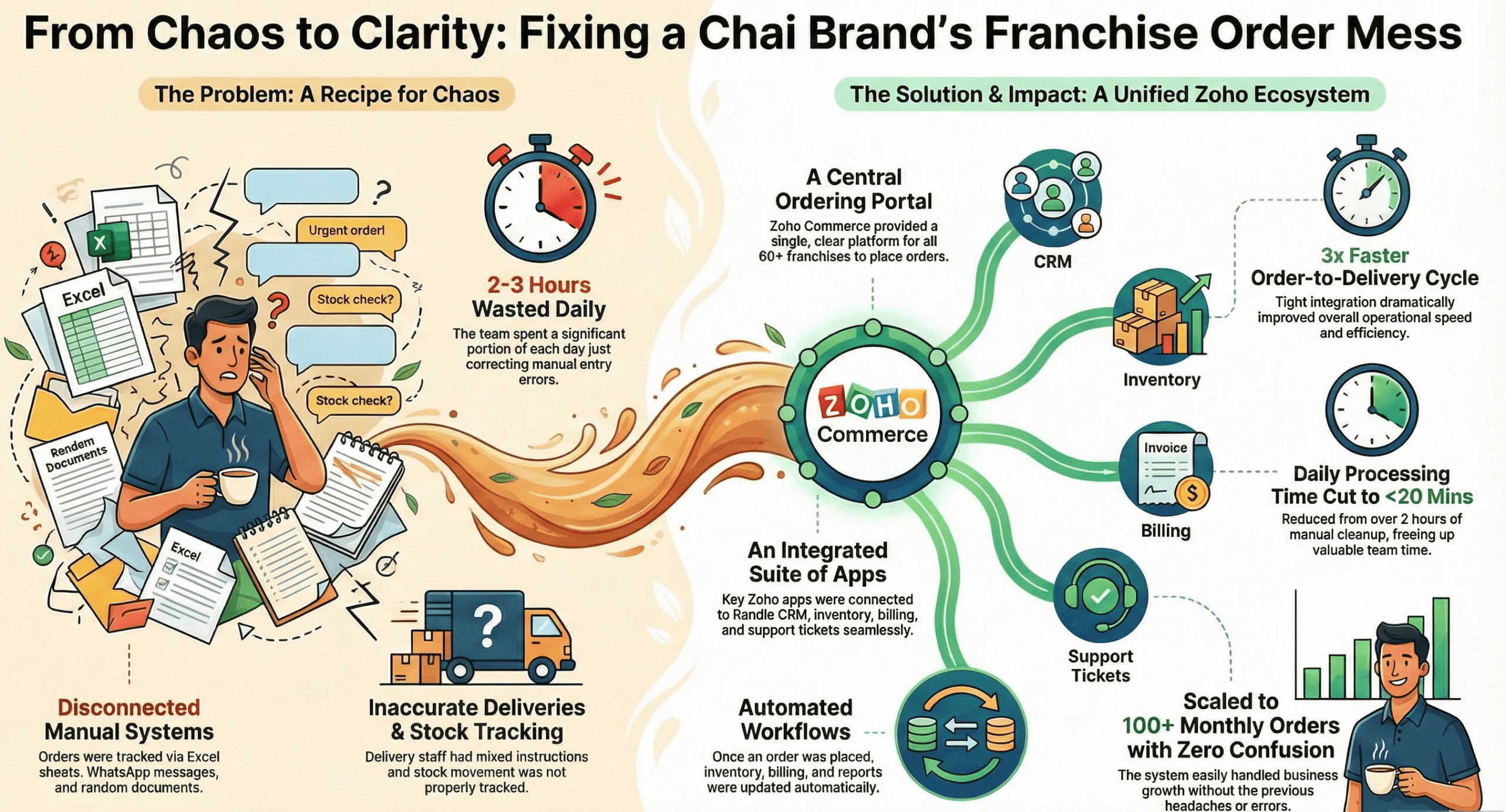
Zoho Commerce
Zoho Commerce Order Management for a Chai Franchise Brand
Orders scattered across Excel sheets and WhatsApp messages moved to a central ordering portal connected to CRM, Inventory and Billing, so every franchise order flows through one system.
60+Franchises live3xFaster delivery<20 minDaily processingRead the case study › -
Zoho People
Zoho People Implementation for a Skincare Brand
Employee records, attendance and leave management for 300+ staff were moved onto Zoho People, with 13 leave policies configured and approvals automated to cut down manual HR work.
300+Employees onboarded13Leave types configured70%Less manual HR workRead the case study ›


Swipe to see all case studies →
Zoho One Migration Services: Every Source System We Move You From
Migration is where Zoho One projects succeed or quietly fail. The configuration work is visible and gets attention. The migration work is invisible until the sales team opens a record in month two and finds the last three notes missing. Each path below gets its own field-level mapping specification rather than a generic import.
CRM and Sales Platform Migrations
We migrate from Salesforce, HubSpot, Pipedrive, Microsoft Dynamics 365, Freshsales, Bitrix24, Odoo CRM, Close, Copper, Insightly, SugarCRM and spreadsheet-based pipelines. The work covers leads, contacts, accounts, deals, custom objects, activity history, notes, attachments, email threading, pipeline stage mapping, owner assignment, territory rules and the automation logic that has to be rebuilt rather than transferred, because no two platforms express workflow the same way.
Accounting and Finance Migrations
Zoho Books and the wider Zoho finance suite receive data from Tally, QuickBooks, Xero, Sage, Busy, MYOB, FreshBooks, Wave, Marg and legacy in-house ledgers. This is a category where small errors matter, because a chart of accounts is not a list. It is a structure with hierarchy, tax treatment and opening balances that must reconcile to the rupee or the cent. We migrate masters, opening balances, historical transactions to your chosen cut-off, tax configuration for GST, VAT or sales tax, recurring invoices, payment terms, currency settings and bank feed reconnection. Every finance migration ends with a reconciliation statement for your accountant to review before you retire the source system.
HR, Payroll and Recruitment Migrations
Into Zoho People, Zoho Payroll and Zoho Recruit we migrate from BambooHR, Keka, greytHR, Darwinbox, standalone Zoho HR instances, smaller Workday estates, sumHR, Kredily, and the spreadsheet-plus-shared-drive arrangement that still runs a surprising number of profitable companies. Employee master data, organisation structure and reporting lines, leave balances and accrual rules, attendance history, salary structures, statutory components such as PF, ESI and gratuity in India or the equivalents in your jurisdiction, appraisal history, document repositories and candidate pipelines can all move across.
Helpdesk, Project and Collaboration Migrations
Zoho Desk takes over from Zendesk, Freshdesk, Intercom, Help Scout, Jira Service Management and shared support inboxes, carrying tickets, threads, contacts, SLA definitions, macros and knowledge base articles. Zoho Projects replaces Monday.com, Asana, Trello, ClickUp, Basecamp, Wrike and Microsoft Project, carrying projects, task hierarchies, dependencies, milestones, time logs and file attachments.
Email, Storage and Identity Migrations
Zoho Mail migrations from Google Workspace, Microsoft 365, Rackspace and self-hosted IMAP servers move mailboxes, folder structures, calendars, contacts, aliases and distribution groups, with domain and DNS cutover planned for a maintenance window rather than performed live. Zoho WorkDrive takes over from Google Drive, OneDrive, SharePoint, Dropbox and Box, preserving folder hierarchy and permission structure. Zoho Directory absorbs identity from Active Directory, Okta and Google identity, a step that is easy to forget until users start complaining about a second password.
Legacy ERP, Custom Database and Spreadsheet Migrations
Where you are running a legacy ERP, a custom Access or SQL Server application, an old Java or .NET internal system, or a set of interlinked spreadsheets that has become load-bearing, the migration begins with reverse-engineering the data model rather than with an export. We profile the source, document the entity relationships that were never written down, design the target structure across Zoho CRM, Books, Inventory, People and Creator, and then migrate. These projects run longer than platform-to-platform moves, and we scope them separately for that reason.
Before migration, AI-assisted tools list your fields, flag duplicates and point out what needs rebuilding, and a consultant reviews the results. After go-live, emails, calls and company WhatsApp can come together into one timeline per deal through Zoho Flow, with a Zia agent that starts in shadow mode.
Zoho-to-Zoho Consolidation
A common starting point is not a competitor. It is scattered standalone Zoho subscriptions that need to become a single Zoho One organisation. Businesses often buy Zoho CRM, then Books some time later under a different admin email, then Desk under a third, and end up with three separate organisations, three user directories and no cross-app automation. Consolidation involves organisation merging, user identity reconciliation, data centre alignment, subscription cancellation timing so you do not pay twice, and the automation build that was impossible while the apps lived apart. If this describes your situation, it is often one of the quicker projects with a clear return.
The Migration Method We Use
Seven steps, in this order. Nothing goes live until step seven produces a clean report. AI is added separately, after go-live.
- 01Source ProfilingCount records, identify field usage, find data quality problems early.
- 02Mapping SpecificationA written field-by-field document you approve.
- 03Cleansing & DedupDone in a working copy, never in your live system.
- 04Test MigrationRun into a sandbox organisation first.
- 05ValidationSampled records checked against source and signed off.
- 06Production RunA defined window, with the source system read-only.
- 07ReconciliationRecord counts and totals proved, not assumed.
- New08AI HandoverAfter go-live: a Zia agent in shadow mode, with one-tap approval for big changes.
How We Use AI to Shorten Your Zoho One Implementation
We use AI inside our delivery method, not as a talking point. The goal is simple: cut the time between your first workshop and your go-live, without cutting the human review on what gets built. AI writes the first draft. A consultant checks it, fixes it and signs it off.
-
AI does the first draft
Faster starting points
Scope notes, field mappings, test cases and documentation all begin as AI drafts, so your team sees something real sooner.
-
A person decides
Review on every line
A consultant checks each draft before it reaches you or your system. The documents you sign are human documents.
Discovery and Requirement Capture
Requirement workshops produce hours of conversation. Normally a consultant spends days turning that into a scope document, and detail gets lost on the way. With your consent, we use workshop recordings and transcripts to draft a structured list of stated requirements, implied requirements, dependencies and open questions. A consultant then checks every line against the recording. You get the scope document sooner, while the conversation is still fresh enough for you to correct it.
Data Profiling, Cleansing and Field Mapping
A source system with hundreds of custom fields across several objects takes a long time to map by hand. We profile the source with AI-assisted tools, draft a proposed mapping to the Zoho target, flag every field where the change is unclear, and surface duplicate clusters and format problems that manual review often misses. The consultant then works through the flagged items, which is where the judgement lives. The mapping specification you sign is a human document. Only the first draft of it is not.
Custom Function and Deluge Development
Deluge functions, custom validation rules, scheduled jobs and API integration handlers are drafted quickly, then tested against real edge cases before a developer approves them. The gain is not in typing faster. It is in how many edge cases get considered before code reaches your system, because that is where defects come from.
Test Case Generation and Regression Checking
Each configured workflow gets a set of test cases covering the normal path and the failure paths. Testing is the step that often gets squeezed when the timeline is tight, and it is why systems break in month three when someone enters a value nobody expected. Drafting the test set with AI means it still happens when time is short.
Documentation and Role-Based Training Material
Administrator guides, role-specific quick references and process walkthroughs are drafted from your actual build, not from a template, so they describe your system rather than a generic one. This matters a year later, when the person who was trained has left and their replacement needs to understand why a field exists.
After Go-Live: AI Inside Your Zoho One
Once your system is stable, we can add AI to the live setup. Emails, calls and company WhatsApp come together into one timeline per deal through Zoho Flow. A Zia agent updates stage, amount and next step, and starts in shadow mode, where it only suggests changes. Closed Won or Lost and big amount changes need one-tap approval, every change goes in a log, and a rep's own edit always wins. Claude or ChatGPT can connect through Zoho MCP, read-only by default, within each user's own Zoho permissions. For sensitive sectors such as healthcare, we use Zia only, with no outside AI.
What We Deliberately Keep Away From Automation
Solution architecture decisions, licensing recommendations, anything involving your financial data reconciliation, security and access role design, and the final approval on every line of code that touches production. Those are human judgements with consequences, so a person makes them. Speed is worth having only where it does not add risk.
Zoho configured for how your industry actually operates
Generic configuration produces generic results. We build industry-specific setups that fit the rules, approval chains and working patterns of your sector.
-
Information Technology
Manage software sales cycles, recurring subscription renewals and technical support tickets alongside project milestones and billable hours in one connected system. We set up milestone-based billing alongside SLA-linked ticket escalation rules.
-
Automobile Dealerships
Track vehicle enquiries, automate test drive scheduling, and trigger post-sale service reminders that bring customers back to your workshop. We link vehicle inventory, by VIN, to enquiry and test-drive records.
-
Real Estate
Capture portal and website leads automatically, track site visits and negotiations, and manage documentation through to registration without losing enquiry history. We build document checklists tied to each project's registration stage, including RERA steps in India.
-
Healthcare and Medical
Handle patient enquiries securely, coordinate specialist referrals, and automate appointment reminders while keeping consultation records organised and access controlled. We set up role-based access so consultation notes are limited to authorised staff.
-
Financial Services
Organise client portfolios, automate KYC documentation workflows, and track loan or policy application stages with a clear audit trail. We set up tiered approval chains that match your sign-off hierarchy.
-
Education and EdTech
Manage admissions enquiries, counsellor follow-up, batch and student records, fee collection and attendance in one system rather than separate spreadsheets. We build tiered fee structures with automated late-payment reminders by batch and course.
-
Manufacturing
Coordinate distributor networks, track bulk order pipelines, link quotations to inventory availability, and align production schedules with confirmed demand. We set up lot and batch tracking from raw material intake to finished goods.
-
Retail and Ecommerce
Centralise purchase history across channels, manage loyalty programmes, and automate campaigns based on actual buying behaviour rather than broad segments. We connect inventory across marketplaces to help prevent overselling in peak periods.
-
Hospitality and Travel
Handle group bookings and itineraries, record guest preferences for repeat stays, and automate feedback collection that feeds into service improvement. We set up seasonal rate cards that can follow occupancy across your properties.
-
Professional Services
Track billable hours against project budgets, manage client contracts and renewals, and monitor delivery timelines so invoicing reflects work actually completed. We set up separate tracking for client funds and operating revenue.
-
Insurance
Automate policy renewal notifications, manage claims processing stages, and track agent and branch performance against conversion targets in live dashboards. We set up commission slabs that recalculate as policy tiers change.
-
Non-Profit Organisations
Manage donor relationships and giving history, track campaign contributions against targets, and coordinate volunteer scheduling and grant reporting. We tag restricted funds so grant money stays traceable to its purpose.
-
New
AI in practice, for every industry
After go-live, emails, calls and company WhatsApp can come together into one timeline per customer or deal through Zoho Flow. A Zia agent updates stage, amount and next step, starting in shadow mode with one-tap approval for big changes. For healthcare, financial services and insurance, we use Zia only, with no outside AI.
Zoho One Partner: Frequently Asked Questions
-
A Zoho One partner is a firm that works with Zoho to sell licences, implement the platform and support it. Buying direct gives you the software, usually at the same list price, but the configuration, migration, customisation and training are left to you. A partner helps you choose the right licences, designs the setup around your processes, migrates your data, builds what does not exist out of the box, trains your team and stays involved afterwards. Datahikes is a Zoho Consulting Partner.
-
Zoho One has two plans, and both include the same apps. All-Employee pricing has a lower price per person, but you license every employee. Flexible User pricing has a higher price per person, but you license only the people who use the software. Prices differ by country and billing period, and Zoho changes them, so we confirm the current figures in your quote instead of printing them here. Local tax is extra.
-
It depends on how many of your people need access. If most of your team will use the system, All-Employee is usually cheaper. If only a part of your team will use it, Flexible User usually is. Count your total headcount and the people who will genuinely log in each week, then compare. We work through this with you before you buy, because the wrong plan can cost a lot over a year, especially with a large non-desk workforce.
-
If you need one or two apps, buy them on their own. From five apps upwards, Zoho One is usually the better value. With three or four apps, it depends on your headcount and which apps you pick. Beyond price, Zoho One gives you one admin panel, one shared user directory and built-in automation between apps that separate subscriptions do not give you.
-
It depends on the number of apps, the systems you are migrating from and how much custom work you need. A typical mid-sized plan runs in phases over about 12 weeks, followed by a hypercare period. Smaller projects with a few apps can be shorter. Multi-country rollouts with custom development take longer. We give you a written plan with dates after the scoping call.
-
Implementation is priced separately from licensing. The cost depends on how many apps you set up, how many systems you migrate, how much integration and custom work you need, and how many people you train. We quote after the scoping call, with optional work shown as separate line items so you can see what each part costs.
-
We can move you from CRMs such as Salesforce, HubSpot, Pipedrive, Microsoft Dynamics 365, Freshsales, Bitrix24 and Odoo; accounting systems such as Tally, QuickBooks, Xero and Sage; HR platforms such as BambooHR, Keka and Darwinbox; helpdesks such as Zendesk and Freshdesk; project tools such as Monday.com, Asana and Jira; email and storage from Google Workspace and Microsoft 365; and legacy ERPs, custom databases and spreadsheets. We also merge scattered standalone Zoho subscriptions into a single Zoho One organisation.
-
Our method is built to prevent it. We profile the source before touching it, write a field-by-field mapping specification that you approve, and cleanse and deduplicate in a working copy rather than in your live system. We then run a test migration into a sandbox, have you check a sample of records, run the production migration in a defined window with the source system read-only, and finish with a reconciliation report that proves record counts and totals. Nothing goes live until that report is clean.
-
For many small and mid-sized businesses, yes. Zoho Books covers accounting, Zoho Inventory covers stock and orders, Zoho People and Zoho Payroll cover HR, Zoho Projects covers operations and Zoho Analytics covers reporting, all connected to each other. It is a weaker fit for discrete manufacturers with complex bills of materials and multi-level MRP, where a dedicated manufacturing ERP or Odoo may suit better. We compare your current ERP against Zoho before recommending a move.
-
Zoho One bundles a large set of connected apps across sales, marketing, customer service, finance, HR, operations, collaboration and IT management, plus mobile apps and admin tools. Both plans include the same apps, so there are no feature tiers. Zoho adds and changes apps over time, so we confirm the current list during scoping.
-
Not with a settings change. You choose the data centre region when you sign up, and moving later means migrating to a new organisation, which is a full project. Choose it against your data residency needs before you sign up, not during a trial.
-
Yes. Every implementation includes hypercare in the first weeks after go-live. After that, we offer support plans that can cover issue resolution, system health reviews, user administration, enhancement requests and regular optimisation. Your support contact already knows your setup, so you do not have to explain your business again on every ticket.
-
Usually, yes. We can build integrations with systems such as Tally, SAP, Microsoft Dynamics, Shopify, WooCommerce, Razorpay, Stripe, telephony platforms and any system with a REST API. For WhatsApp, we use your company's WhatsApp Business API, never your reps' personal phones, and message templates are approved by Meta. We build integrations with Zoho Flow, Deluge scripting or direct API work, depending on data volume and reliability needs. We confirm each one during scoping.
-
We use AI to write first drafts, and a consultant reviews them. Workshop recordings, with your consent, become a draft scope document. Source data is profiled and field mapping is drafted for a consultant to check line by line. Deluge functions are drafted and tested against edge cases before a developer approves them, and test cases and documentation are drafted from your actual build. Architecture decisions, licensing advice, security role design and the final approval of production code stay with people.
-
Yes, through Zoho MCP, after go-live. Access is read-only for questions and reports, and read and write only for tasks you approve, always within each user's own Zoho permissions. MCP uses Zoho API credits. We start any AI agent in shadow mode for a few weeks, ask for one-tap approval on Closed Won or Lost and big amount changes, keep a change log, and a rep's own edit always wins. For sensitive sectors such as healthcare, we use Zia only, with no outside AI. See our AI partner page for more.
-
Delivery costs in India are usually lower than quotes from North America or Western Europe for similar scope, which is why offshore delivery is common in software services. Our Chennai team works 9:00 AM to 7:00 PM IST, which overlaps with the UK morning, and we arrange flexible slots for US clients. What matters most is whether the partner is competent, so ask who specifically will do the work.
-
Yes. We audit the existing setup, document what was built and why it is not working, scope the fix, and rebuild what needs rebuilding. Common causes are too many apps switched on at once, no data model design, permission structures that were never mapped, and automation built without testing.
-
Yes, especially because All-Employee pricing gives a small team access to a wide suite of apps. The caution is scope. Start with three to five apps, set them up properly, get your team using them, then add more. Businesses that switch on many apps in the first month often struggle to get adoption.
-
Sam, our Co-Founder and Zoho Solutions Architect, or Jay, our Co-Founder and Digital Solutions Manager. Your scope call is not taken by a sales development representative, and the person who scopes your project stays involved in delivering it.
No questions match your search. Try a different term.
Talk to a Zoho One Partner
If you are weighing Zoho One against other options, choosing between the two licensing plans, planning a migration, or trying to recover an implementation that stalled, a short scope call will get you further than another week of comparison articles. The call is taken by Sam or Jay. You should leave it with a clear view of the right licences, scope and timeline, whether or not you work with us.
Curious about AI? Ask us how a Zia agent can start in shadow mode after go-live, with one-tap approval for big changes and a rep's own edit always winning.
- Taken by Sam or Jay
- About 30 minutes
- No obligation