Certified Zoho CRM Partner in USA. Get AI-Powered Implementation & Migration
Datahikes is a certified Zoho CRM Partner in USA, delivering AI-accelerated CRM implementation, migration, custom development and managed support to businesses across New York, San Francisco, Los Angeles, Chicago, Houston, Dallas, Austin and Atlanta. Whether you are moving off Salesforce, HubSpot, Pipedrive or Microsoft Dynamics, or setting up Zoho CRM for the first time, we handle every phase from discovery to go-live with US time zone support and no third-party subcontractors. We also support teams across North America, including our Zoho CRM partner services in Canada.
New
A Zoho CRM that updates itself. We connect your email, phone calls and SMS to one timeline per deal, and a Zia agent updates deal stages and next steps for your reps. Your data stays inside Zoho, or reps can update the CRM by asking Claude or ChatGPT through Zoho MCP. Big changes always need one click to confirm. See how our Zoho AI setup works.
New YorkSan FranciscoLos AngelesChicagoHoustonDallasAustinAtlanta
Every consultation is handled personally by Sam or Jay, our founding members, so you always speak to someone who knows Zoho inside out.
20+Countries served
100%In-house delivery, no third parties
US TZTime zone-aligned support
Book Free Consultation
0+In Operation Since
0+Countries Served
0+Industries Supported
0.0/5Google Rating
2–6 WeeksAverage Go-Live
Zoho CRM Partner in USA
What Makes Datahikes the Right Zoho CRM Partner in USA for 2026?
Finding the right Zoho CRM Partner in USA means more than finding a company that can configure modules. It means working with a partner that understands the business behind your CRM, the compliance rules American businesses follow, and what US sales and operations teams need: a system that works from day one and stays accurate after that.
Datahikes has built Zoho CRM implementations for SaaS companies in Silicon Valley, financial services firms in New York, healthcare operations in Chicago, manufacturers in the Midwest, and real estate agencies across Texas and Florida. Our delivery is built around your outcome, not our convenience. We scope, configure, test and hand over a system your team will actually use, not a half-configured platform you have to figure out yourself. For US companies with teams abroad, we also run Zoho CRM projects in the UK under the same process.
AI-First Delivery
As a Zoho CRM Partner in USA, we differ from most competitors in one key way: we are an AI-first consulting firm. We use AI to speed up data audits, check field mapping, draft workflow logic, and validate migration accuracy before a single record moves to production. That means faster delivery, fewer errors, and a better CRM setup than manual methods alone.
⚡Data AuditsAI-assisted audit of your existing CRM records before migration
🗂Field MappingAutomated mapping checks across modules and data types
⚙️Workflow LogicAI-drafted workflow rules matched to your sales process
✅Migration QAValidation checks before any record moves to production
After go-liveA Zoho CRM that updates itself
Every channel, one timelineEmail, phone calls and SMS are logged to the right deal automatically.
Zia agent updates dealsStages, amounts and next steps move from real conversations, and your data stays inside Zoho.
Ask Claude or ChatGPTReps update or check Zoho CRM in plain English through Zoho MCP, within their own permissions.
In-House Delivery. US Time Zone Support. Zero Third-Party Dependency.
Every Datahikes project is delivered in-house by our own team in Chennai, so your project is never subcontracted, passed to another vendor, or handed to a junior team after the contract is signed. Our Zoho Technical Architect, Mani, and Zoho Solution Architect, Sam, manage the technical delivery on every US engagement, including AI setup.
Jay handles client communication, project management and commercial oversight. US clients across Eastern, Central and Pacific time zones get support during their business hours, with dedicated response windows.
Eastern (ET)Central (CT)Pacific (PT)
JA
JayOperations & Digital Solutions Manager
SA
SamZoho Solution Architect
SS
SaiZoho Technical Architect
Zoho CRM Partner in USA
How Datahikes Uses AI to Speed Up Zoho CRM Implementation in the USA, and Keep Your CRM Updated
Datahikes is an AI-first Zoho CRM Partner in USA. This is not a marketing label; it is how we deliver projects. We use AI in three phases of every implementation: data preparation, configuration design and migration validation. Then, in an optional fourth phase after go-live, we set up AI so your Zoho CRM keeps itself up to date. The result is faster delivery, fewer errors, and a CRM that stays accurate long after launch.
6–10 wksTraditional manual delivery
→
3–6 wksAI-assisted delivery by Datahikes
PHASE 01
AI-Driven Data Audit Before Migration
Before any data moves from your current CRM into Zoho, our AI tools scan your source data for duplicate records, missing values, inconsistent formats, and broken links between contacts, accounts and deals. A manual audit of 50,000 records takes a team days. Our AI-assisted audit runs in hours and produces a clear cleanup report the migration team works from.
PHASE 02
Automated Field Mapping and Duplicate Resolution
Field mapping is where most Zoho CRM migrations go wrong. Our AI mapping layer compares your source fields with Zoho's fields and suggests field-to-field mappings with a confidence score. Our architects review and approve every mapping before migration begins. The result is a validated mapping document, not a best-guess CSV import.
PHASE 03
AI-Generated Workflow Design and Testing
Rebuilding your current workflows in Zoho is not a copy-and-paste job. Our AI tools review your existing workflow logic and suggest Zoho-native versions that reach the same outcome with fewer rules and better coverage. We also use AI-generated test cases to check every workflow before go-live, catching edge cases manual testing misses.
PHASE 04 · AFTER GO-LIVE
A Self-Updating Zoho CRM Your Reps Do Not Have to Babysit
Most CRMs go stale because reps are too busy selling to update them. We fix that by logging every email, phone call and SMS to one timeline per deal. A Zia agent then reads what happened and updates the deal stage, amount and next steps. After each meeting, the rep gets one short question and replies in a sentence or a quick voice note instead of filling in forms.
Reps who prefer Claude or ChatGPT can update or check Zoho CRM in plain English through Zoho MCP, for example "move the Acme deal to Negotiation and remind me Friday". See how our Zoho AI setup works.
1. CaptureEmail, calls and SMS land on the right deal
2. AskOne short question after each meeting
3. UpdateZia agent updates stage, amount and tasks
4. ConfirmOne click for big changes like Closed Won
Built-in guardrails
AI only updates a field when it is confident; otherwise it asks the rep
Closed Won, Closed Lost, lead conversion and big amount changes need one click to confirm
Every AI change is logged with a reason, so managers can audit it
Runs in shadow mode for 2 to 3 weeks before it changes anything
With Zia, your customer data stays inside Zoho; MCP access stays within each rep's permissions
Some Zia features, such as call analysis, need Zoho CRM Enterprise or above, and MCP uses Zoho API credits. We confirm all of this before you commit.
Zoho CRM Partner in USA
Our Zoho CRM Services for US Businesses in 2026
As a certified Zoho CRM Partner in USA, Datahikes delivers every Zoho CRM service US businesses need across the full CRM lifecycle, from setup and migration to custom development, AI setup and long-term managed support.
Implementation
Zoho CRM Implementation USA
As your Zoho CRM Partner in USA, we design and deploy Zoho CRM around your US sales process, not a generic industry template. Every project starts with a discovery workshop where we map your pipeline stages, lead sources, contact relationships, deal workflows and reporting needs. We then configure Zoho CRM to match exactly, including custom modules, field types, page layouts and role-based permissions. Every implementation includes a structured testing phase and a handover with recorded training and admin documentation.
Migration
Zoho CRM Migration Services USA
Datahikes manages CRM migrations from Salesforce, HubSpot, Pipedrive, Microsoft Dynamics 365, Freshsales, Odoo and Bitrix24 with zero data loss and zero downtime. Our seven-step method covers data audit, field mapping, cleansing, sandbox migration, workflow rebuild, user training and post-go-live support. We stay engaged for 30 days after go-live to fix any discrepancies, retrain users on edge cases, and tune workflows based on real usage.
Custom Development
Zoho CRM Custom Development USA
When Zoho's built-in options do not cover your needs, we build custom solutions using Deluge scripting, Zoho Creator and custom API integrations. US businesses come to us for custom commission calculators, automated contract generation, approval workflows for US legal requirements, and dashboards for regional sales management. Our developers build, test and document every custom component before delivery.
Training & Adoption
Zoho CRM Training and Adoption USA
A well-configured Zoho CRM your team does not use is wasted money. Datahikes delivers role-based training for US sales reps, sales managers, marketing teams and CRM admins through live remote sessions and recorded video libraries. Training is built around your setup, not Zoho's generic walkthroughs. If you add our AI setup, reps also learn the one-line post-meeting update, so keeping the CRM current takes seconds, not minutes.
Managed Support
Zoho CRM Support and Managed Services USA
Post-implementation support covers version updates, new feature setup, user access management, report building, workflow changes and troubleshooting across all US time zones. Managed service plans give you a fixed monthly engagement with a set number of support hours, priority response times and quarterly optimisation reviews, plus AI rule tuning and change-log reviews if you use our AI setup. Support comes from the same team that built your CRM, not a separate helpdesk.
Staff Augmentation
Hire a Zoho CRM Developer in USA
US businesses that need dedicated Zoho CRM development capacity can work with us on a staff augmentation model, without the overhead of a full-time hire. Our developers are available for project-based work, sprint retainers or long-term embedded partnerships. Every developer holds active Zoho certifications and has at least three years of Zoho-specific experience. Rates are well below US-based Zoho developers, with the same or better quality thanks to our structured QA process.
New · AI Setup
Zoho CRM AI Setup USA: A Self-Updating CRM
Most US sales teams lose hours every week updating the CRM, and it is still out of date by Friday. We set up Zoho CRM so it updates itself from the work your reps already do. Emails, phone calls and SMS land on one timeline per deal, a Zia agent updates the stage, amount and next steps, and reps can also update Zoho by asking Claude or ChatGPT through Zoho MCP. You start with a 4 to 6 week pilot on one sales team.
Zia agent reads email and call summaries and updates deals
One short post-meeting question instead of long forms
Claude or ChatGPT access through Zoho MCP, within each rep's permissions
Confidence checks, one-click approvals and a full AI change log
Shadow mode for 2 to 3 weeks before anything goes live
Zoho CRM Partner in USA
Step-by-Step Zoho CRM Migration Guide for US Businesses
Migrating to Zoho CRM is not just exporting a spreadsheet and importing it into a new system. A correctly run Zoho CRM migration for a US business follows seven structured steps. Skipping or rushing any of them is the main reason CRM migrations fail, not the platform itself.
01
Data Audit and Source System Inventory
Before touching your current CRM, take a full inventory of every module, field, record type, workflow, integration and user role. Note what is actively used, what is outdated or duplicated, and what must move to Zoho. US businesses often discover that 20 to 40 percent of their stored data is duplicated, outdated or never used. Cleaning it before migration is faster and cheaper than cleaning it after.
Partner Advantage: Datahikes uses AI-assisted source system analysis to finish this inventory in hours, not days. You get a structured data map covering contacts, accounts, deals, activities and custom objects.
02
Field Mapping and Module Design
Map every field in your source CRM to its Zoho CRM equivalent. Where no direct match exists, design the closest Zoho-native option. This step decides how accurate your Zoho CRM setup will be. Wrong mapping here causes errors in reporting, automation and pipeline visibility that can take months to find and fix.
Partner Advantage: Datahikes checks every field mapping through our AI mapping layer before a single record moves. Our architects review all proposed mappings and confirm them against your Zoho setup.
03
Data Cleansing and Duplicate Removal
Remove duplicate contacts and accounts, standardise phone numbers, ZIP codes and email addresses, fill in fields Zoho CRM requires but your old system did not, and archive inactive records. Bad data imported into Zoho does not disappear; it corrupts your pipeline reports, breaks automations, and erodes trust in the new system within weeks of go-live.
04
Sandbox Migration and Testing
Run a full migration into a Zoho sandbox before touching your live system. Check record counts, relationships, field accuracy and custom module behaviour. Test every automation trigger, approval workflow and integration. US businesses that skip sandbox testing discover problems on day one of go-live, in front of users who are already nervous about the new system.
05
Workflow and Automation Rebuild
Your current CRM's automations do not transfer to Zoho on their own. Every workflow rule, email notification, approval process and assignment rule must be rebuilt in Zoho's workflow engine and Blueprint. This is also the right time to improve your automation, not just copy it. Zoho often lets you combine five old workflow rules into one cleaner process.
06
User Training and Go-Live
Train every user before go-live, not after. Role-based sessions should cover the daily tasks each user does: creating leads, converting opportunities, logging activities, running reports and approving records. US sales teams with territory structures, commission splits or multi-currency deals need training built around their own setup, not Zoho's generic help videos.
07
Post-Go-Live Support and Optimisation
The first 30 days after go-live are the riskiest part of any CRM migration. Adoption either takes hold or falls apart in this window. As your Zoho CRM Partner in USA, we provide active support for 30 days after go-live, covering user questions, data issues, workflow changes and adoption coaching. Most issues in this period are small configuration tweaks, not fundamental problems, and they are fixed quickly with the right support.
Keep it clean with AI: clean data on day one goes stale by month three if reps have to type every update. We can log email, calls and SMS to one timeline per deal and set up a Zia agent to update stages and next steps automatically. It runs in shadow mode for 2 to 3 weeks first, and big changes always need one click to confirm. See how our Zoho AI setup works.
DIY Migration vs. Partner-Led Migration: What Changes at Each Step
Step
DIY Migration
With Datahikes (Partner-Led)
Data Audit
Manual spreadsheet review; often skipped due to time pressure
AI-assisted source system scan; structured data map before migration begins
Field Mapping
Best-guess CSV mapping; errors found after import
AI-checked mapping reviewed and signed off by an architect before execution
Data Cleansing
Usually skipped; dirty data goes into Zoho
Mandatory step; AI deduplication plus manual review of high-risk records
Sandbox Testing
Often skipped; go-live on the first import attempt
Full sandbox run with a test case matrix covering all modules and workflows
Workflow Rebuild
Manual copy of old rules; missed edge cases
AI-assisted workflow design with better logic and Zoho-native automation
Training
Self-service Zoho help centre; low adoption
Role-based live sessions plus a recorded library matched to your setup
Post-Go-Live
No structured support; issues pile up
30-day active support with a dedicated response window
Keeping Data CurrentAI
Reps type updates by hand; data goes stale within weeks
Zia agent updates deals from real email, calls and SMS, with one-click approvals and a full change log
Data Audit
DIYManual spreadsheet review; often skipped due to time pressure
With DatahikesAI-assisted source system scan; structured data map before migration begins
Field Mapping
DIYBest-guess CSV mapping; errors found after import
With DatahikesAI-checked mapping reviewed and signed off by an architect before execution
Data Cleansing
DIYUsually skipped; dirty data goes into Zoho
With DatahikesMandatory step; AI deduplication plus manual review of high-risk records
Sandbox Testing
DIYOften skipped; go-live on the first import attempt
With DatahikesFull sandbox run with a test case matrix covering all modules and workflows
Workflow Rebuild
DIYManual copy of old rules; missed edge cases
With DatahikesAI-assisted workflow design with better logic and Zoho-native automation
Training
DIYSelf-service Zoho help centre; low adoption
With DatahikesRole-based live sessions plus a recorded library matched to your setup
Post-Go-Live
DIYNo structured support; issues pile up
With Datahikes30-day active support with a dedicated response window
Keeping Data Current AI
DIYReps type updates by hand; data goes stale within weeks
With DatahikesZia agent updates deals from real email, calls and SMS, with one-click approvals and a full change log
Zoho CRM Partner in USA
Common Zoho CRM Migration Issues US Businesses Face
Based on documented issues in Zoho's official knowledge base, Zoho Community forum reports, and our own delivery experience across 20+ countries, these are the eight most common problems US businesses run into when moving to Zoho CRM, including two that only show up after go-live.
High Risk
Data Duplication and Dirty Records on Import
The most common migration failure is importing duplicate contacts, accounts and deals without cleaning them first. Zoho CRM's import tool does not deduplicate automatically; it imports exactly what you give it. The result is a new CRM that looks messier than the one it replaced, which destroys user confidence in the first week.
Run AI-assisted deduplication and mandatory data cleansing before any record moves to the Zoho sandbox.
High Risk
Broken Field Mapping Between CRM Systems
Salesforce, HubSpot and Pipedrive all use different data structures and field types. A multi-select picklist in Salesforce maps to a different field type in Zoho, and a custom object may need to become a related module. Wrong mapping puts data in the wrong field, makes reports show wrong numbers, and triggers automations on the wrong values.
Check every field mapping with an AI mapping layer and architect sign-off before migration begins.
Medium Risk
Missing Email History and Activity Logs After Migration
A very common complaint after migration is missing email history and past activity on migrated records. This happens because email history lives in the email client, not the CRM. For US businesses where past sales communication matters for account management and legal records, this gap is serious.
Connect Zoho CRM to your email right after migration, sync historical email where supported, and log calls and SMS to the same timeline.
High Risk
Workflow and Automation Logic Not Transferring Correctly
Every CRM handles automation differently. Zoho CRM's workflow rules, Blueprint processes and Zia triggers work differently from Salesforce Process Builder, HubSpot Workflows or Pipedrive automations. Copying old logic straight into Zoho often creates workflows that fire at the wrong stage or send duplicate notifications.
Rebuild automation from what it is meant to achieve, using Zoho-native tools, not by copying old settings.
High Risk
User Adoption Failure After Go-Live
A perfect migration means nothing if your US sales team does not use the system. Reps who move to Zoho without role-specific training often go back to spreadsheets or email within 30 days. The answer is training before go-live, with sessions that show each user exactly how to do their daily tasks in Zoho.
Run role-based live training before go-live, and cut data entry to a one-line update after each meeting.
Medium Risk
Integration Breaks with Third-Party Tools
US businesses run Zoho CRM alongside Stripe, QuickBooks, Xero, Shopify, Slack, DocuSign and many marketing tools. Custom API integrations break when source fields change, endpoints are updated, or authentication tokens expire. Every integration must be tested in the sandbox, documented with credentials and refresh schedules, and monitored after go-live.
Test every integration in the sandbox, document credentials and token refresh schedules, and monitor every connection during the 30-day post-go-live window.
High Risk AI fix
CRM Data Goes Stale Within Weeks of Go-Live
Even a clean migration falls apart if reps stop updating the CRM. Deal stages move only before the Monday pipeline review, call notes stay in notebooks, and leads never get converted. Within a few weeks, leadership is reading forecasts that describe last month, not this week.
Set up a self-updating CRM: email, calls and SMS land on one timeline per deal, a Zia agent updates stages and next steps, and reps answer one short question after each meeting. See how it works.
Medium Risk AI fix
AI Tools Connected Without Guardrails
More US teams now connect ChatGPT or Claude to their CRM on their own. Without rules, an AI tool can change deal stages or amounts with no approval and no record of what changed, and data may be sent to an AI provider on a personal plan with weak data terms.
Use Zoho MCP within each rep's permissions, add confidence checks and one-click approvals for big changes, keep a full AI change log, and test in shadow mode first.
Zoho CRM Partner in USA
Zoho CRM Pricing for US Businesses in 2026
Zoho CRM pricing in 2026 is competitive with the major enterprise alternatives at a fraction of the cost. Understanding both the Zoho licence cost and the implementation investment from a Zoho CRM Partner in USA helps US businesses budget accurately and avoid surprises
Official Zoho CRM Licence Costs (2026)
Free$0up to 3 usersBest for
Freelancers & micro teams
Leads, contacts, deals
Basic automation
Standard$14user / month · annual billingBest for
Small businesses
Scoring & workflows
Email templates
Professional$23user / month · annual billingBest for
Growing sales teams
Blueprints & inventory
Google Ads integration
Most PopularEnterprise$40user / month · annual billingBest for
Mid-market & enterprise
Zia AI & custom modules
Multi-currency
Ultimate$52user / month · annual billingBest for
Large enterprises
Advanced analytics
Premium AI features
Monthly billing runs 20 to 34 percent higher across every tier. Zoho CRM Plus, which bundles sales, support, marketing, and analytics, is available at approximately $57 per user per month and is often better value than stacking individual add-ons for US businesses using multiple customer-facing tools.
Price verified by Sam, Solutions Architect, Datahikes Updated August 2026All fees are confirmed at scoping stage. No engagement begins without a signed Statement of Work with itemised line costs.
Get a written quote within 24 hoursContact Jay or Sam directly. Every quote is scoped, itemised, and delivered with no obligation.
As a Zoho CRM Partner in USA, Datahikes manages every type of CRM-to-Zoho migration for businesses across New York, California, Texas, Illinois and Florida. Each migration below has its own service page with the full process, data checklist, timeline and common issues for that platform.
New YorkCaliforniaTexasIllinoisFlorida
→Zoho CRM
Salesforce to Zoho CRM Migration
The most requested migration for US businesses leaving Salesforce because of licence costs or feature lock-in. We move all Salesforce objects, custom fields, validation rules, Process Builder automations, reports and dashboards into Zoho CRM with zero data loss and zero downtime.
→Zoho CRM
HubSpot to Zoho CRM Migration
The preferred path for US SaaS, marketing and tech companies that have outgrown HubSpot's pricing tiers or need more flexible CRM customisation. Contacts, companies, deals, email sequences, lists and HubSpot workflows all need careful mapping before migration.
→Zoho CRM
Microsoft Dynamics 365 to Zoho CRM Migration
The most complex migration, because of Dynamics' deep Microsoft 365 integration, custom entities and enterprise permission model. US businesses usually make this move to cut total cost of ownership and simplify their tech stack. We handle all six data layers: records, relationships, custom entities, workflows, security roles and integrations.
→Zoho CRM
Pipedrive to Zoho CRM Migration
A common path for US businesses that have outgrown Pipedrive's pipeline-only model and need Zoho CRM's workflow engine, AI features and multi-module setup. Pipedrive's deals and contacts map cleanly to Zoho, but stage names, custom fields and activity types each need review before migration.
→Zoho CRM
Freshsales to Zoho CRM Migration
Usually chosen by US businesses that want deeper integration with Zoho's suite, including Zoho Books, Zoho Desk and Zoho Campaigns, which do not connect natively with Freshsales. Contacts, deal history, email conversations and custom activity types all need structured planning to move accurately.
→Zoho CRM
Odoo to Zoho CRM Migration
A move from an ERP-first setup to a CRM-first platform with separate ERP integration. US businesses leaving Odoo CRM often keep Odoo for inventory and manufacturing while moving the customer-facing CRM to Zoho. This needs careful scoping of which data belongs to the CRM migration and which stays in the ERP integration.
→Zoho CRM
Bitrix24 to Zoho CRM Migration
Common for US businesses that started on Bitrix24's free tier but find its interface and workflows hard to manage at scale. Contacts, deals and activities migrate cleanly. Bitrix24's chat and project data needs separate handling and usually moves to Zoho Cliq and Zoho Projects for a full Zoho setup.
→Self-updating CRM
After Any Migration: Make Zoho CRM Update Itself
Clean data on day one goes stale if reps have to type every update. Once your migration is done, we can log email, calls and SMS to one timeline per deal and set up a Zia agent to update stages and next steps. Reps can also update Zoho by asking Claude or ChatGPT through Zoho MCP, with one-click approval for big changes.
Not sure which migration path fits your business?Jay or Sam will review your current CRM, recommend the right approach, and show how much of it could update itself afterwards, at no charge and with no obligation.
Datahikes has set up Zoho CRM for US businesses across eight major industries. Each one has its own needs for pipeline structure, compliance, data fields and reporting. Our implementations are built around those needs, not adapted from a generic template, and each can include AI that keeps the CRM updated.
SaaS and Technology
Subscription management and renewal trackingExpansion revenue pipelines and product usage triggersStripe billing integration
AIFlags renewals with no client email in 30 daysSilicon Valley · Austin
Financial Services and Fintech
KYC workflow automation and compliance trackingLoan application pipelines and wealth management portalsMulti-account relationship mapping
AIEvery AI change logged with a reason, ready for auditsNew York · Chicago · Dallas
Healthcare
Patient enquiry management and referral coordinationAppointment pipeline trackingHIPAA-aware setup on Zoho infrastructure
AIUses Zoho's own Zia, so patient data stays inside ZohoChicago · Houston · Atlanta
Real Estate
Property listings and buyer/seller pipelinesZillow and Realtor.com lead automationClosing document management
AIA buyer's reply books the showing and updates the stageTexas · Florida
Manufacturing
Distributor network and bulk order pipelinesProduction schedule alignmentSupply chain communication
AIDistributor call summaries saved on the accountUS Midwest
Retail and E-commerce
Shopify and Amazon marketplace integrationPurchase history and loyalty programmesCampaigns triggered by purchase behaviour
AIAsk ChatGPT "top buyers this month" through Zoho MCPNationwide
Consulting and Professional Services
Billable hours and client contract managementProject milestone trackingAccurate billing across multi-client portfolios
AIA quick voice note after a client call updates the dealNationwide
Insurance Agencies
Policy renewal automation and claims pipelinesAgent performance dashboardsMulti-branch coverage management
AIRenewal replies create follow-up tasks for the agentNationwide
Your industry not listed? Datahikes has delivered Zoho CRM across 20+ countries and many sectors beyond these eight, and any of them can get a self-updating Zoho CRM. Contact Jay or Sam for a sector-specific scoping call.
Real projects delivered by our Chennai based team for clients across healthcare, retail and manufacturing, with measurable results in weeks rather than months.
Fragmented Salesforce and QuickBooks data was consolidated into a single Zoho One platform, with custom workflows replacing manual entry and real time dashboards replacing spreadsheet reporting.
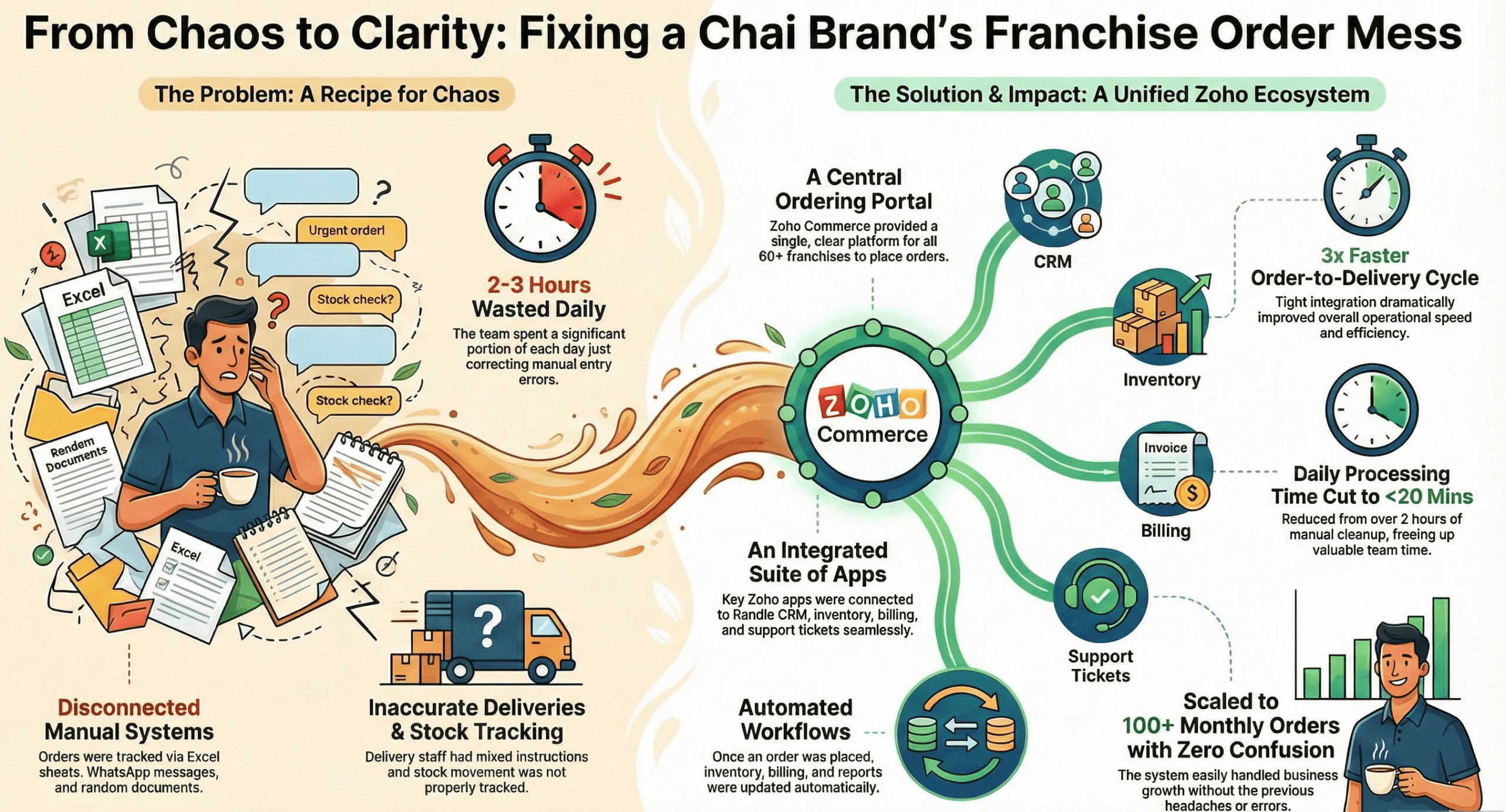
Orders scattered across Excel sheets and WhatsApp messages moved to a central ordering portal connected to CRM, Inventory and Billing, so every franchise order flows through one system.
Employee records, attendance and leave management for 300+ staff were moved onto Zoho People, with 13 leave policies configured and approvals automated to cut down manual HR work.
Zoho CRM vs Salesforce vs HubSpot: Why US Businesses Are Switching in 2026
77%Lower licence cost vs Salesforce Enterprise per user per month
$32,400Annual licence saving for a 20-user US sales team vs Salesforce
2–8 wksZoho CRM implementation time vs 3–6 months for Salesforce
Factor
Zoho CRM (Enterprise) RECOMMENDED
Salesforce (Enterprise)
HubSpot (Professional)
Licence Cost / User / Month
$40 Lowest
$175
$90+
Implementation Cost
$3K–$20K Lowest
$15K–$100K+
$5K–$30K
AI Features Included
✓ Yes, Zia built in
Extra cost (Einstein AI)
Limited at base tier
AI Agents and MCPNew
✓ Zia agents plus Zoho's hosted MCP servers for Claude and ChatGPT
Agentforce, paid add-on
Breeze agents, uses HubSpot credits
Customisation Depth
Very High
Very High
Moderate
Multi-currency Support
✓ Yes (Enterprise+)
✓ Yes
✓ Yes
Time to Implement
2–8 weeks Fastest
3–6 months
4–12 weeks
Zoho Ecosystem Integration
Native, 45+ apps Best
Third-party only
Third-party only
Best For
SMB to Mid-Market
Large Enterprise
Marketing-led SaaS
Zoho CRM EnterpriseRECOMMENDED
Licence Cost$40 / user / mo
Impl. Cost$3K–$20K
AI FeaturesYes, Zia built in
AI Agents & MCPZia agents + MCP for Claude and ChatGPT
CustomisationVery High
Time to Implement2–8 weeks
EcosystemNative, 45+ apps
Best ForSMB to Mid-Market
Salesforce Enterprise
Licence Cost$175 / user / mo
Impl. Cost$15K–$100K+
AI FeaturesExtra cost (Einstein AI)
AI Agents & MCPAgentforce, paid add-on
CustomisationVery High
Time to Implement3–6 months
EcosystemThird-party only
Best ForLarge Enterprise
HubSpot Professional
Licence Cost$90+ / user / mo
Impl. Cost$5K–$30K
AI FeaturesLimited at base tier
AI Agents & MCPBreeze agents, uses HubSpot credits
CustomisationModerate
Time to Implement4–12 weeks
EcosystemThird-party only
Best ForMarketing-led SaaS
For a 20-user US sales team, switching from Salesforce to Zoho CRM saves $32,400 per year on licence fees alone.Zoho CRM Enterprise at $40 per user per month is a 77 percent cost reduction compared with Salesforce Enterprise. US businesses increasingly name this gap as the main reason they work with a Zoho CRM Partner in USA, with total cost of ownership deciding the switch when the Salesforce renewal comes around.And the switch does not mean giving up AI. After migration, Datahikes can set up a Zoho CRM that updates itself from email, calls and SMS, with Zia agents doing the work Salesforce charges extra for.
Talk to the Founders
Your Consultation Will Be Handled by Sam or Jay, Datahikes Founding Members
Deep expertise in Zoho CRM configuration, Deluge development, enterprise data migration and AI setup. Sam leads the technical scoping on every US engagement, so your requirements are captured by the person accountable for delivery.
JA
JayCo-Founder and Digital Solutions Manager
PMOData AnalyticsSEO StrategyUS and International MarketsProject Management
Background in PMO, data analytics and SEO strategy across US and international markets. Jay handles client communication, commercial oversight and project management from the first call to final handover.
No sales development reps. Your first call is with Sam or Jay, not someone reading a script before passing you to the technical team.
Same people throughout. If your project goes ahead, you work with the same team from the first call to the final training session.
Requirements captured correctly. Scoping is done by the people accountable for delivery, with no account managers in between.
Honest AI advice. We tell you which parts of your CRM can update themselves with AI and which still need a person. No hype, and no lock-in to one AI tool.
Speak directly with Sam or Jay about your Zoho CRM projectEmail us at connect@datahikes.com or book a call below. We reply to all US enquiries within 24 hours, and send a written quote within 48 hours of the first call, including a short note on how much of your CRM could update itself.
Why Choose Datahikes as Your Zoho CRM Partner in USA
US businesses choose Datahikes as their Zoho CRM Partner because we work to outcomes, not hours. We do not charge for time spent learning your system. We scope, agree and deliver to a defined outcome at a fixed project fee.
Certified Zoho SpecialistsOur whole delivery team holds active Zoho certifications across CRM, Creator, Books and Desk.Verified Certifications
AI-First DeliveryWe use AI at every stage of implementation and migration to cut timelines and improve accuracy, and after go-live to keep your CRM updated.Faster Delivery
In-House OnlyNo subcontracting. The team you brief is the team that delivers, from scoping to final handover.Zero Subcontracting
20+ CountriesUS businesses with teams abroad get one partner across markets, including our Zoho CRM work in the UK, Canada and Australia.Global Delivery
Fixed ScopingEvery project starts with a signed Statement of Work that sets deliverables, timeline and cost. No open-ended engagements.Signed SOW
Post-Go-Live Support30 days of active support after every implementation, included in the project scope, with no extra cost and no ticketing system.Included in Scope
Founders Accessible ThroughoutSam and Jay are reachable throughout the project, not just at the sales stage. You deal with decision-makers from the first call to the final training session.Direct Founder Access
AI With GuardrailsYour CRM updates itself from email, calls and SMS, with confidence checks, one-click approvals for big changes, a full AI change log and shadow mode first. See how it works.Self-Updating CRM
Ready to start your Zoho CRM project with a Zoho CRM Partner in USA?Book a free scoping call with Sam or Jay. No obligation and no sales script, just a direct conversation about your CRM needs, how we will deliver them, and how much of your CRM could update itself.
Datahikes is a certified Zoho CRM Partner in USA with a full in-house delivery team, AI-powered implementation methodology, and founder-led client engagement. As a Zoho CRM Partner in USA, we serve businesses across New York, Chicago, San Francisco, Los Angeles, Houston, Dallas, Atlanta, and Austin from our Chennai delivery centre with US timezone support
A Zoho CRM Partner in USA provides certified implementation, migration, customisation, integration, training, and support services for Zoho CRM. Partners differ from resellers in that they configure the CRM around your business requirements rather than simply selling a licence. The best partners also handle data migration, rebuild your automations in Zoho, and provide post-go-live support.
Zoho CRM licence costs range from $14 per user per month (Standard) to $52 per user per month (Ultimate) on annual billing. Implementation fees from a certified partner typically range from $3,000 for basic 10-user setups to $50,000 or more for enterprise deployments with complex custom development. Datahikes provides written scope-based quotes within 48 hours of an initial call.
Zoho CRM implementation timelines with a Zoho CRM Partner in USA typically run two to eight weeks depending on user count, number of custom modules, integration complexity, and data migration scope. Datahikes' AI-assisted delivery methodology reduces standard implementation timelines by 30 to 40 percent compared to traditional manual approaches.
Yes. Salesforce to Zoho CRM migration is the most requested service from US clients who choose Datahikes as their Zoho CRM Partner in USA. We manage the complete migration including data export, AI-assisted field mapping, data cleansing, sandbox testing, workflow rebuild, training, and post-go-live support with zero data loss and zero downtime.
Yes. Datahikes manages HubSpot to Zoho CRM migrations with full data integrity across contacts, companies, deals, email history, and activity logs. HubSpot marketing automation sequences require reimplementation in Zoho Campaigns as part of the migration scope.
A Zoho reseller primarily sells Zoho licences. A Zoho CRM implementation partner provides the technical services to configure, customise, and deploy Zoho CRM around your specific business requirements. Datahikes is both a Zoho partner and an implementation specialist — we sell licences and deliver the full implementation in-house.
Yes. Datahikes provides role-based Zoho CRM training for US sales teams, sales managers, marketing teams, and CRM administrators through live remote sessions and recorded video libraries. Training is tailored to your specific Zoho configuration, not Zoho's generic feature walkthroughs.
Datahikes uses AI tools to accelerate data audits, automate field mapping validation, generate workflow design recommendations, and produce test case matrices for sandbox validation. This reduces implementation timelines by 30 to 40 percent and eliminates the most common failure modes: dirty data migration and incorrect field mapping.
Yes. Datahikes integrates Zoho CRM with Stripe, QuickBooks, Xero, Shopify, DocuSign, Slack, Mailchimp, HubSpot data exports, Salesforce data exports, and a wide range of MarTech and ERP tools commonly used by US businesses. All integrations are configured and tested before go-live.
Yes. US businesses with international operations are served through Datahikes' global delivery network covering Canada, United Kingdom, Australia, India, UAE, Germany, and 15 additional countries. A single Datahikes engagement can cover multi-country Zoho CRM rollouts from one centralised delivery team.
Yes. Datahikes is a certified Zoho partner listed in Zoho's partner directory at zoho.com/partners/. You can verify our partner status and certifications directly through Zoho's official partner search tool.
Datahikes serves US businesses in all major cities including New York, San Francisco, Los Angeles, Chicago, Houston, Dallas, Austin, Atlanta, Miami, Seattle, Boston, Denver, Phoenix, Philadelphia, and all other US markets. All delivery is remote from our Chennai headquarters with US timezone support.
Yes. Datahikes offers Zoho CRM developer staffing for US businesses on project, sprint-based retainer, and long-term embedded partnership models. All developers are based in our Chennai centre, hold Zoho certifications, and have a minimum of three years of Zoho-specific development experience.
Still have questions about your Zoho CRM project in the USA?Sam or Jay will answer directly no auto-responders, no ticketing queue. Expect a reply within 24 hours.
What Our US Clients Say About Working With Datahikes
From Zoho CRM and Zoho People to Zoho One and Creator apps, here is how clients across the United States describe working with our Zoho consultants.
★★★★★4.8/5Based on client reviews on Google
Zoho CRM Optimisation
Datahikes helped us completely optimize our company’s use of Zoho CRM, streamlining our workflows and improving how our teams operate day to day. Sai took the time to understand our business needs, customize solutions, and make sure everything was implemented smoothly. The level of professionalism, responsiveness, and attention to detail from Datahikes was outstanding. We’re now operating more efficiently than ever thanks to their support. Highly recommend Sai and Datahikes to any company looking to get the most out of Zoho!
GGeorgeManager, Real Estate · Texas
Zoho People Implementation
Working with Datahikes on our Zoho People project was a great experience. Their team was professional, organized, and creative, making sure everything was set up to fit our needs. They didn’t just implement the system; they really thought about how it would work best for us. Even after the project, they’ve provided ongoing support and are always quick to help out when we need it. We’d definitely recommend Datahikes for a reliable and innovative Zoho partner.
SSamanthaHRBP, IT Company · New Jersey
Multi-Project Partnership
We’ve had the pleasure of working with Datahikes on multiple projects, and they have consistently exceeded our expectations. Even when project scope evolves, Sam and his team remain committed, ensuring every deliverable is completed with precision. Their flexibility, professionalism, knowledge over AI and dedication to achieving our goals make them a great Zoho partner.
GGlen BrownFounder, AI Based Business · Texas
Ongoing Zoho Support
We have been working with Jay and the Datahikes team for several months, and our experience has been very positive. They are consistently responsive, knowledgeable with AI technologies, and efficient when helping us with tasks in our Zoho. Their support has made a noticeable difference in keeping our projects on track and running smoothly. Thank you to the Datahikes team - We look forward to continuing our partnership moving forward.
JJon ThornDirector, Technology Company · California
Zoho One Support
We’ve been working with Datahikes for all our Zoho One needs, and they have been outstanding. Their team is extremely responsive, consistently helpful, and demonstrates deep expertise across every Zoho product we use. They have streamlined our workflows and made our Zoho adoption far more effective. What truly sets them apart is their ability to understand our complex systems and translate them into efficient, practical workflows. As a result, our operations have become more streamlined with AI, and we are better equipped to serve our clients. Highly recommended for anyone looking for a reliable and expert Zoho Partner.
FFazir HossainTechnical Project Manager · Texas
Zoho Implementation
We had a wonderful experience working with Datahikes. Jay and their team is highly professional, responsive, and committed to delivering quality solutions on time. From understanding our requirements to implementing innovative ideas, they ensured every detail was handled with care. Communication was smooth throughout the project, and the final outcome exceeded our expectations. I highly recommend Datahikes to anyone looking for a reliable AI technology partner & Zoho Implementations.
TTushar SinghHRBP · New Hampshire
Zoho Creator App Development
I contacted Datahikes since my company needs a lending mobile app software solution. I received the greatest advice possible first, and then the tailor-made Zoho Creator software. Jay and their team are extremely competent and committed to their jobs. They are extremely knowledgeable, which is a huge help. Even we were inspired by the enthusiasm they brought to the table. They adhered to deadlines and worked very closely with our internal team.
WWilliam JohnsonCEO · Washington
Zoho Creator and CRM
I highly recommend Datahikes for any of your Creator & CRM needs. For the last several years, they have acted as extension of our tech Ops team by supporting us strategically, tactically, and operationally on a global scale across key marketing channels. Their knowledge & experience is foundational to our success as a marketing team for both individual campaigns and channel performance. Additionally, all of them are so lovely to work with - I consider them as colleagues, not just consultants, & look forward to continuing to work with them!
 Zoho One